
Isaac SIM/Lab 설치기. re-1
들어가면서
전체 그림을 생각하지 않고 버전의 선택과 설치를 진행하다가, 결국 모두 다시 지우고 롤백했다.
롤백과 동시에, 기존에 작성했던 글 3개를 지우고 다시 써 내려 간다.
설치 자체는 요새 트렌드 따라 ChatGPT를 통해 할 수 있으나 어떤 목적으로 실험할 것인가에 따라 설치되는 구성이 달라지니,
우선 본인의 목적과 계획을 정리하고 난 다음 구성해보는게 좋겠다.
Isaac Sim과 Isaac Lab의 조합
| 세대 | 특징 |
|---|---|
| Sim 4.0~4.2 + Lab 1.x | Isaac Lab 초기 안정화기 |
| Sim 4.5 + Lab 2.0~2.2 | 상당히 안정적, 기존 연구 많음 |
| Sim 5.0 + Lab 2.2 | 물리/actuator 개선 |
| Sim 5.1 + Lab 2.3.2 | 2.x 최종 안정 조합 |
| Sim 6.0.1 + Lab 3.0 beta | 최신 센서/physics architecture |
현재 공식 홈페이지 링크 에 있는 버전별로, 적용 가능한 Isaac Lab을 묶어보면 위와 같다.
저기서 Isaac Sim에 물리엔진 변화가 제법 크리티컬한데, 기존엔 PhysicX 기반의 물리엔진에서 Newton-Backend 물리엔진이 추가되면서 설치시 주변 환경이 많이 바뀐다. 특히 6.0에서 강조하는건 multitick rendering도 지원에서 센서별 다른 업데이트 주기에 대한 렌더링을 지원하는 모양인데 자세한건 더 찾아봐야겠다만… 이것때문에 Isaac Lab을 3.0 beta로 선정해야 하고, 이미 되어있는 강화학습 모델을 PhysicsX/Newton 설정에 맞춰 일일이 코드를 짜워야 하기때문에, 처음 접하기엔 제법 어려움이 많다.
또한 ROS와의 연계에 있어 복잡함이 있는데, 파이썬의 버전이 달라, Isaac Sim 내부 파이썬으로 고정하는 작업도 병행해줘야 한다.
나중에 좀더 안정화가 되면 또 도전해보겠지만, 지금 단계에서 휴머노이드와 ROS의 연결을 중심으로 SLAM성능을 판단하기엔, Isaac Sim을 굳이 6.0으로 올려야 하는가에 대한 고민이 들게 된다.
따라서, 다 지우고… 5.1로 새로 설치했다. 설치 과정은 단순하다. 폴더명 적절하게 만들고, 파일 다운받아 압축 푼 다음, post-install 만 해주면 끝난다. 추가로 Assets을 다운받으면 되는데, 모두 받아 압축을 풀면 거의 300GB 에 육박하므로, 카테고리별로 순차적으로 받는것도 고민해볼만 하다.
여튼 설치는 공식문서를 참조하자.
Isaac Sim 설치 이후 첫 셋업
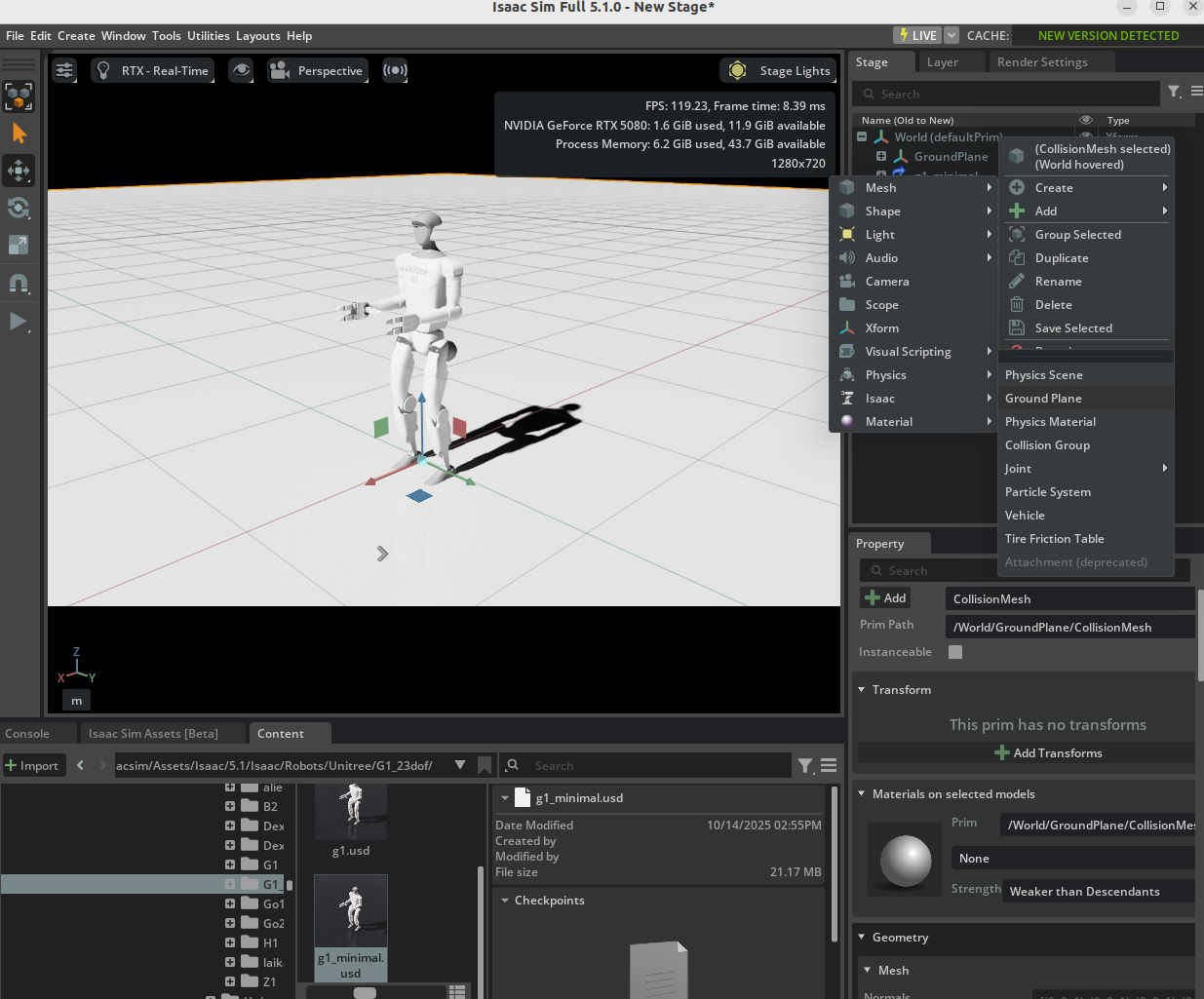
Ground Plane을 넣고, Asset 중 유니트리의 G1 로봇을 드래그해서 배치해본다. G1 Minimal을 배치해본다. (이것도 사실 미리 확인해보고 넣으면 좋을텐데.)
재생버튼을 눌렀을때 잘 서있게 하려면 발이 Ground plane 살짝 아래에 있으면 시작시 천천히 올라와 안착된 상태로 시작한다. 이편이 나은것 같다.
ROS 연결하기
ROS Extension이 잘 켜져있는가 확인해야 한다.
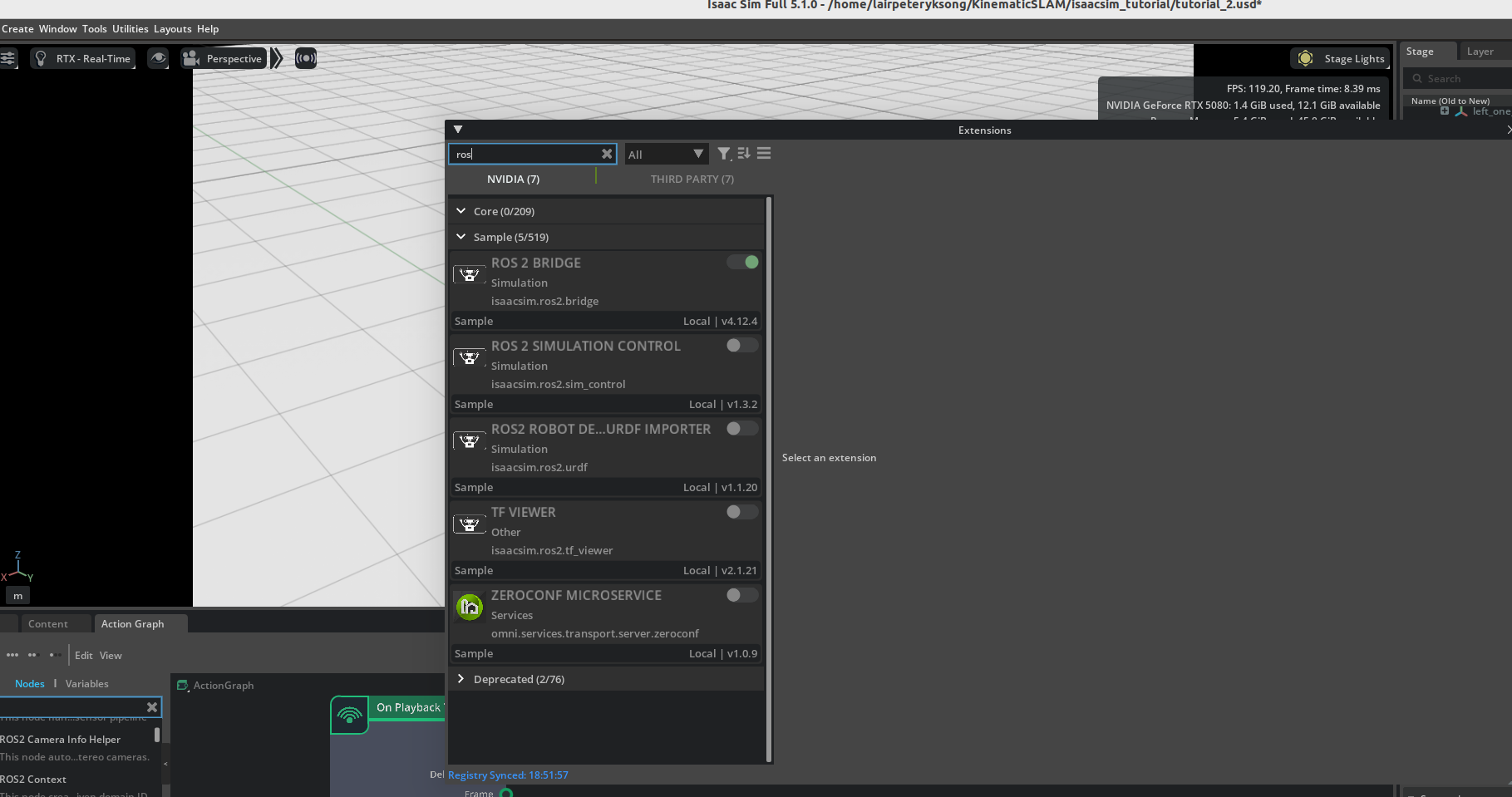
Action graph를 설정해서 노드들을 만들고, imu link에 imu센서를 붙여보자.
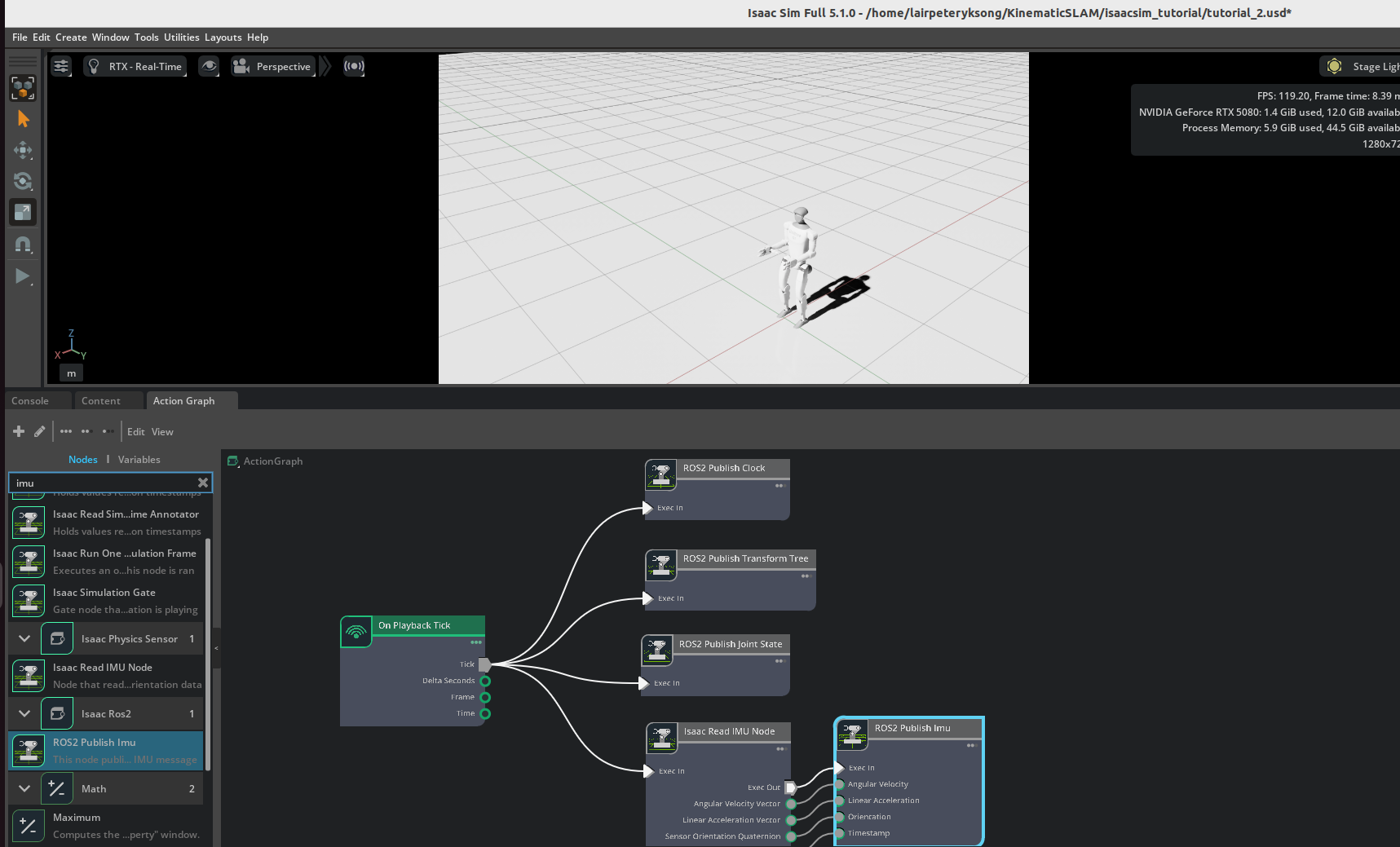
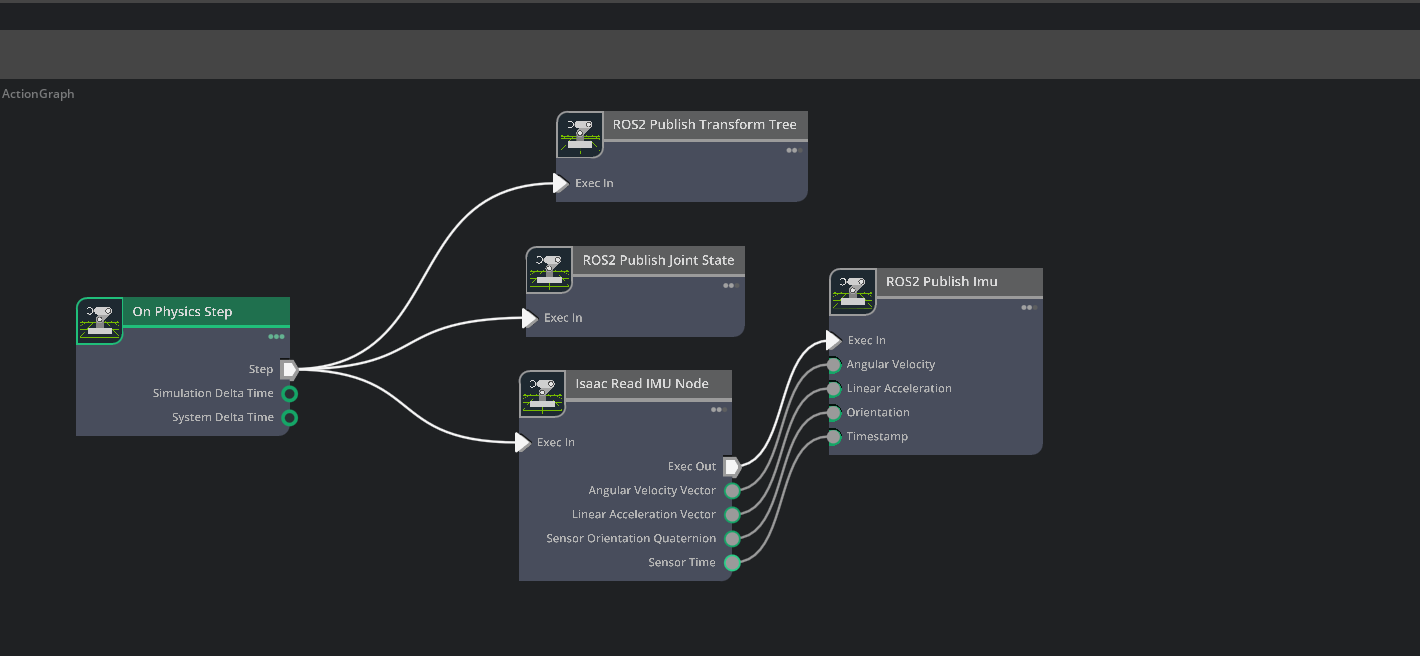
이전에 그냥 돌려볼때와 지금이 조금 달라졌는데, 앞에 playback tick을 쓰던걸, On Physics Step으로 변경한다. 그전에는 렌더링을 목적으로 그래프를 구성했다면, 이번엔 시뮬레이션을 목적으로 그래프를 구성한다.
world model에 Update rate 변경을 위해 PhysicsScene을 추가해서, 전체적인 물리 솔버의 연산속도를 올려보자.
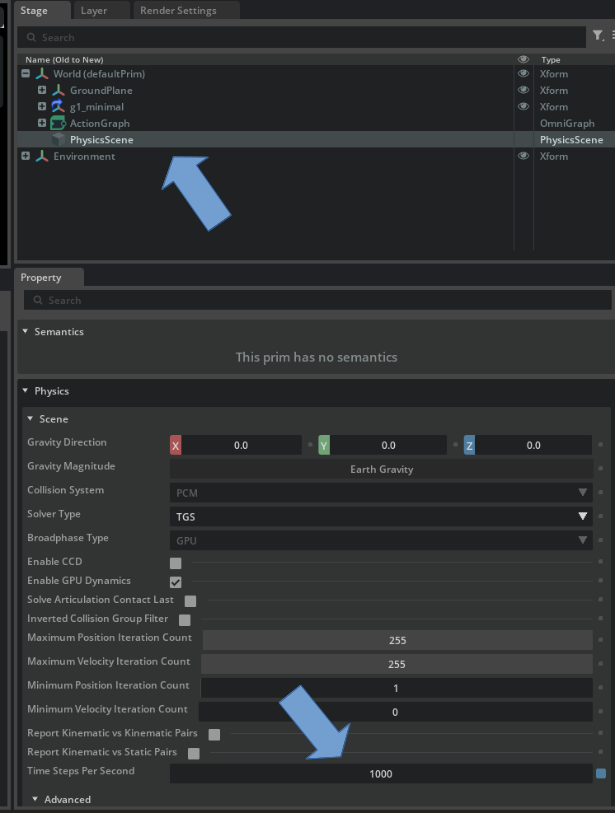
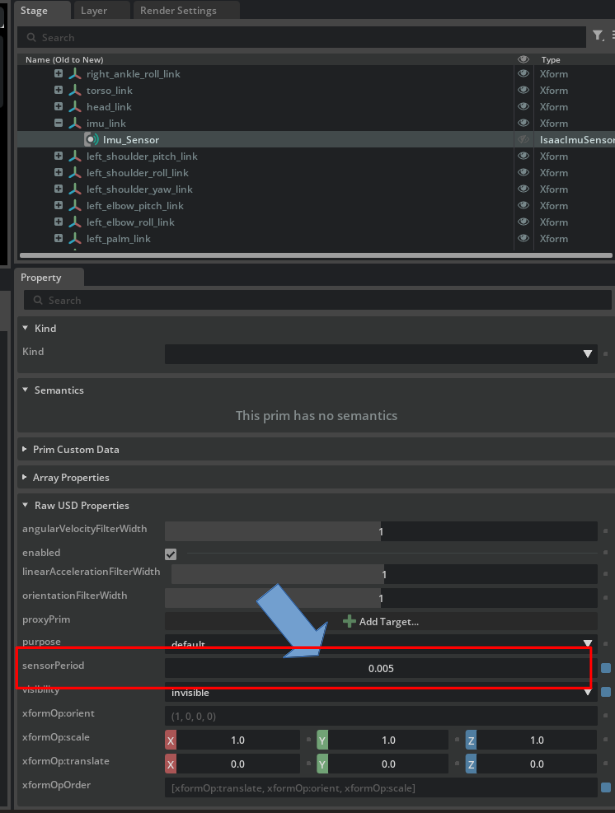
imu 센서의 업데이트 주기는 200Hz로 설정해보자. 시뮬레이션은 1kHz였다.
Nyquist 수라는게 있다. 계측하고자 하는 주파수에 맞춰 계측기는 어떻게 설정해야 할때 배운 기억이 나는데, 보통은 10배정도 해야 한다는 식으로 이야기한다.
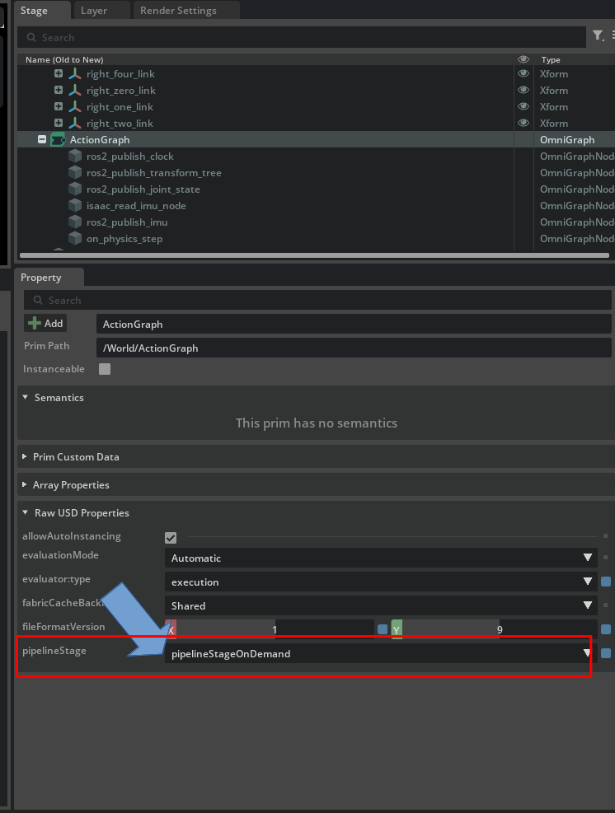
Action Graph의 Pipeline도 수정해준다. OnDemend로 바꾸야 한다. 안그러면 ROS Topic이 안나온다.
이제 왼쪽 메뉴바의 재생버튼을 누르고 시뮬레이션을 돌리면 로봇이 화면에 서있는걸 볼 수 있다.(뭐, 서있지 않고 넘어질수도 있겠지만.)
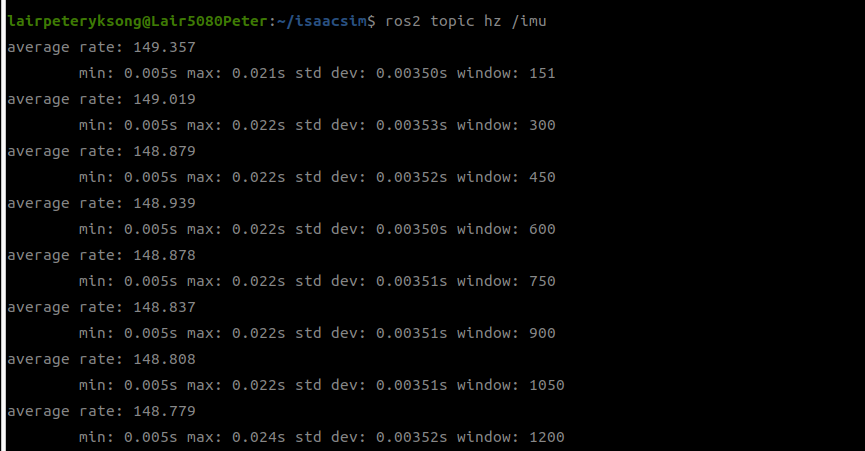
Rate 를 200Hz로 설정했지만, 실제 현재 PC 설정으로는 148Hz가 최대인듯 하다. 렌더링 옵션이라던가 조절해도 한계가 있을 수 있으니 너무 무리하진 말자.
실제 연산은 설정한대로 되고 있으니, 알고리즘 성능테스트 목적이라면 나중에 ROSbag을 참조하던가, Time stamp의 시간 간격을 확인해보면 데이터가 제대로 나오고 있는지 확인할 수 있다.
ros2 topic echo /imu로 확인해보면, 이어진 두개의 메세지의 시간을 확인해볼수 있다.
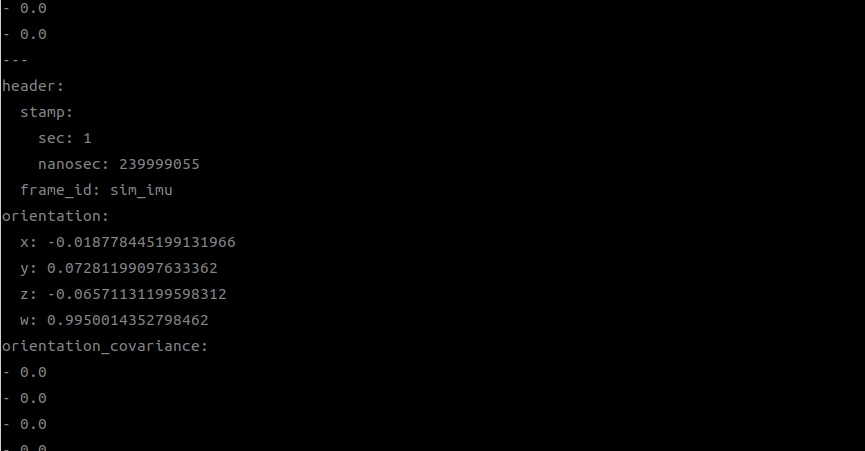
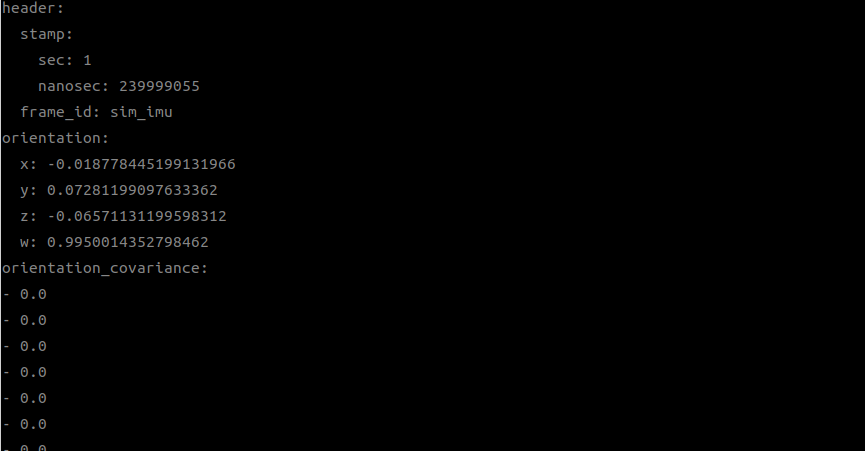
nanosec: 239999055 nanosec: 239999055
….??? 음?
좀 길고 쉽게 보기위해 ros2 topic echo /imu --field header.stamp.nanosec 로 확인해보자.
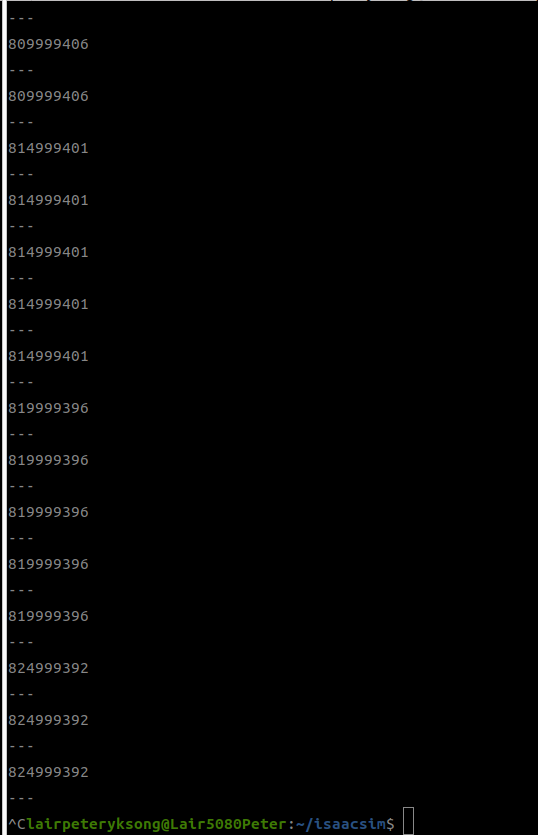
시간의 중복이 많다. 왜지?
그도 그럴게, solver는 1khz로 돌면서 실행 트리거를 계속 보내니, ROS2 Publish IMU노드가 이 트리거에 반응해서 게속 같은 값을 뿌리게 되는 경우다. 이제 그 관련 노드들을 다음ㄱ과 같이 수정해보자.
- Action Graph에서 Node 탭 옆에 Variable 탭을 찾아 변수 하나를 등록하자.
PreviousTime - Compare 노드를 붙여서, 센서 시간과 PreviousTime 을 비교하자. Operation 은
!= - Branch 노드를 배치해서, Exec out을 받아, condition이 True일때 트리거를 전달하게 하자.
- 트리거가 실행되면 ROS2 토픽도 발신하지만, 지금 센서시간을 PreviousTime에 저장하자.
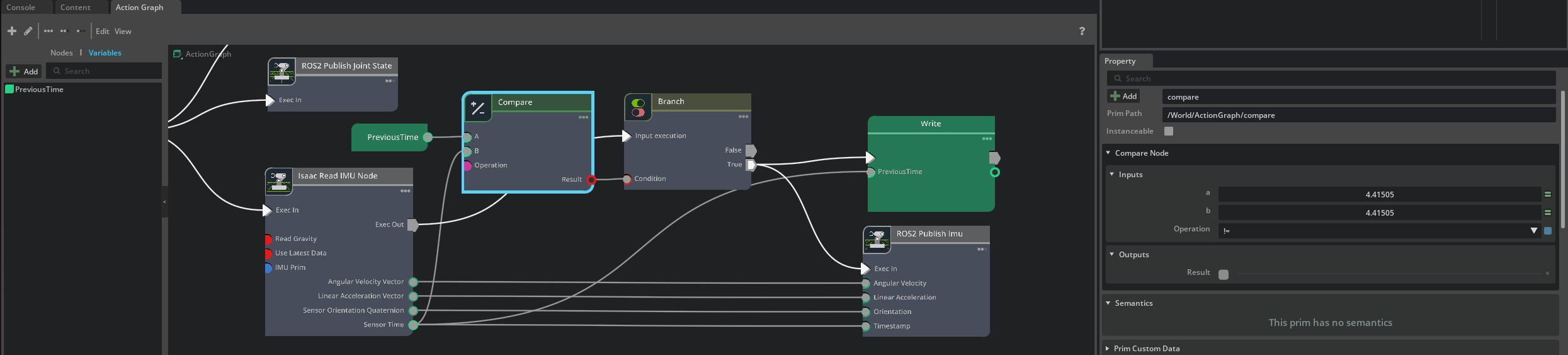
이제 5ms 간격으로 timestamp가 찍히는걸 확인할 수 있다.
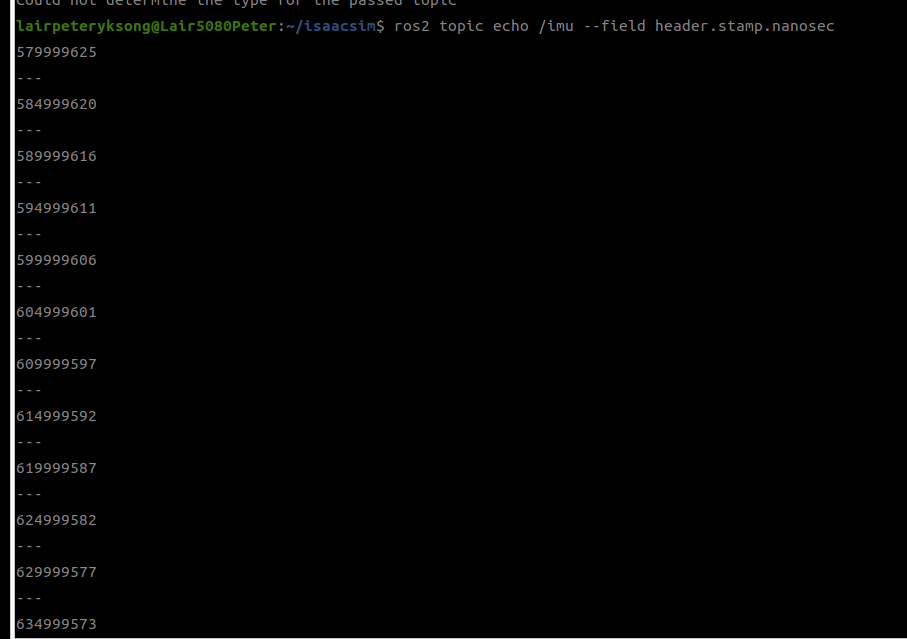
이쯤 되니까 오는 고민이,
이거 속도가 안나오는데 써도 되나 하는 생각이 좀든다. ..
여기까지 일딴 끝.
IsaacLab 연결
이제 Isaac Lab에서 방금까지 만든 USD 파일을 불러들여야 한다.
만약 이게 Mobile Robot이라면 모르겠지만, 4족보행로봇이나 휴머노이드 같은 경우 보행을 위해서 강화학습을 통해 얻은 가중치(weight)를 사용하는 경우가 많으므로 이걸 활용하려면 Isaac Lab을 통해 동작시켜야 한다.
여기서 이견이 좀 많은데, 연구실 다른 동료들의 말을 빌려보면, 강화학습의 병렬처리를 위한 이유 아니라면 굳이 Isaaclab을 추천하지 않더라. 이쪽은 보행 알고리즘을 개발하는 팀이기에, 시뮬레이션 환경이 정확하고 빠른가를 주로 보는 경우인지라, Mujoco를 더 선호하는 듯하다.
그러나 내 경우에는 휴머노이드에 여러 센서들을 붙이고 테스트해야 하는 입장이므로, 센서 구성의 편집이 쉬운 IsaacSim/Lab 계열이 초기 접근에 더 유리한 측면이 있다. Mujoco의 경우 커스텀 센서를 붙이려면 Offset 계산을 통해 Extrinsic/Intrinsic 파라미터들을 모두 적용해야 하기에, 아무래도 편의성면에선 IsaacSim 이 편한건 어쩔수 없다.
Issac Lab의 설치
Isaac Lab의 설치는 git을 Clone 한 한 다음, ./isaaclab.sh -i 의 순으로 실행하면 된다. 링크
python 관련한 설정에서 충돌이 일어나는 경우도 있고, Isaac sim과의 연결을 위해 작업을 해야 할 경우도 있다. 관련해서는 검색해가면서 하자. 내 경우, IsaacSim을 StandAlone으로 설치했기때문에(다운로드 받아 압축만 풀어 쓰는 경우다.) 이런 자잘한 문제들이 발생한다.
1) 우선 공식 git을 통해 다운로드 받는다.
cd ~
git clone https://github.com/isaac-sim/IsaacLab.git
2) IsaacLab의 git 버전 지정
여기서 설치하려는 버전은 2.3.0 이다. 2.3.2도 되는데.. 왜 난 굳이 어렵게 가나. 뭐 별 차이 없겠지.
cd ~/IsaacLab
git fetch --tags
git tag
git checkout v2.3.0
git status
3) _isaac_sim 심볼릭 링크 생성
IsaacSim을 Standalone으로 설치한 경우 이게 필요하다. IsaacSim을 IsaacLab에서 사용할 수 있도록 연결해주는 작업이다. 현재 isaacsim은 ~/isaacsim 에 설치되어있다.
cd ~/IsaacLab
ln -s ~/isaacsim _isaac_sim
연결이 확인되었음을 확인하려면 다음과 같다.
ls -l _isaac_sim
ls -l _isaac_sim/python.sh
./_isaac_sim/python.sh --version
4) python / python3 기본 명령 확인 Isaac Lab 설치 스크립트를 실행하기 전에 Python 명령이 정상적으로 존재하는지 확인한다.
which python
which python3
which python에서 아무런 출력이 없다면 다음 패키지도 설치하는게 좋다.
sudo apt update
sudo apt install python-is-python3
설치 후 확인
python --version
python3 --version
5) Isaac Lab 설치 버전 지정과 _isaac_sim 연결, Python 명령 확인이 끝났다면 Isaac Lab 설치를 진행한다.
cd ~/IsaacLab
./isaaclab.sh -i
설치의 확인은 다음과 같이 해보자.
ls -l _isaac_sim
ls -l _isaac_sim/python.sh
./_isaac_sim/python.sh --version

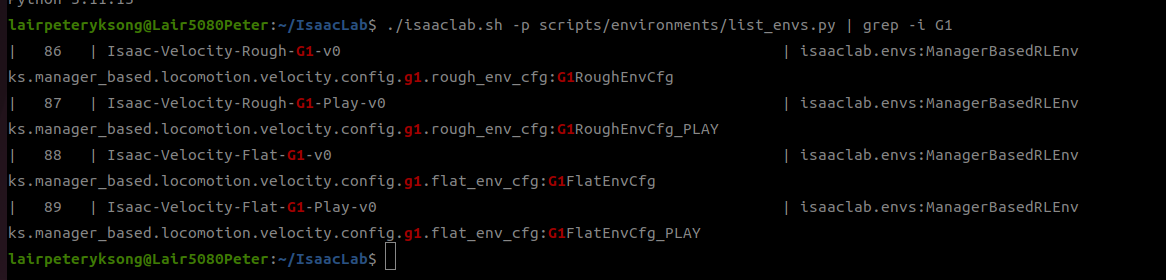
6) G1 Task 확인 Isaac Lab 설치가 완료되면 환경 목록을 확인한다.
./isaaclab.sh -p scripts/environments/list_envs.py | grep -i G1
7) test Run
앞서서 설치된 G1 Task 중에 아래 항목이 있는지 확인해보자. 웬만해선 있을것이다.
Isaac-Velocity-Flat-G1-v0
Isaac-Velocity-Flat-G1-Play-v0
이제 돌려보면 된다.
./isaaclab.sh -p scripts/reinforcement_learning/rsl_rl/play.py \
    --task Isaac-Velocity-Flat-G1-Play-v0 \
    --num_envs 1 \
    --use_pretrained_checkpoint
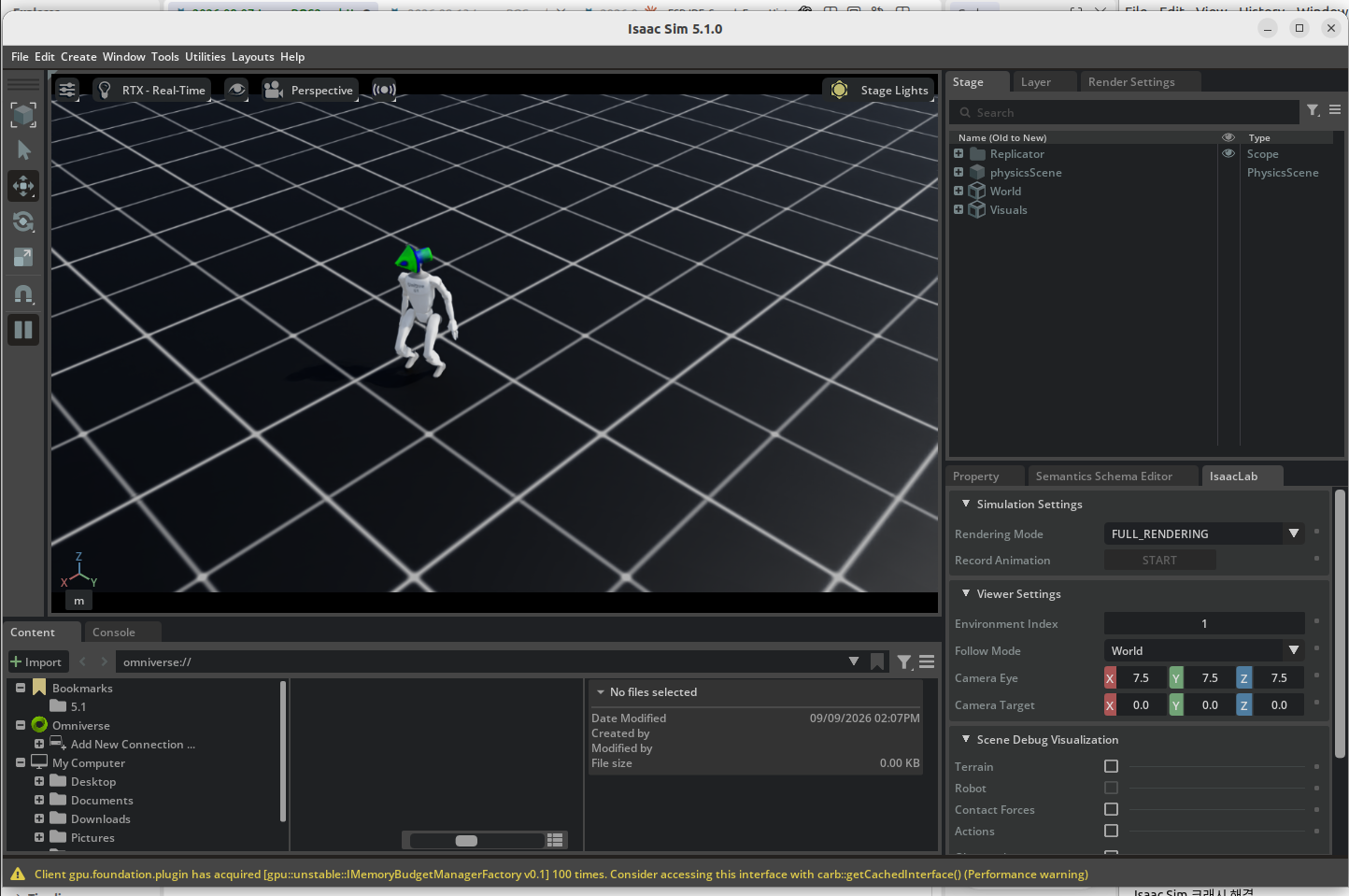
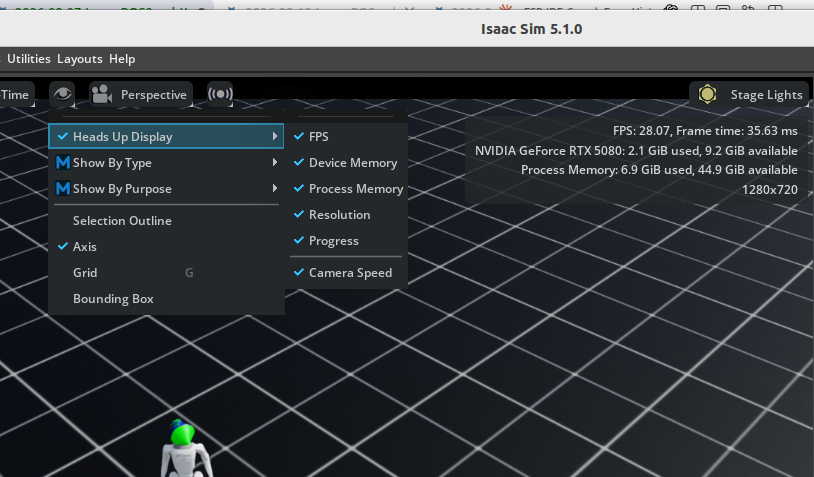
렌더링 화면 우측 상단에 메모리 사용량이나 속도같은 정보가 나오지 않는데, 그건 가운데 눈알 버튼(viewpoint)를 누르면 설정할 수 있다.
USD 파일 불러오기
IsaacSim에서 작업했던 파일은 아래 경로에 저장되어있다.
/home/lairpeteryksong/KinematicSLAM/isaacsim_tutorial/tutorial_2.usd

적당한 폴더를 만들고, 거기에 실행 스크립트를 작성해서 넣어보자. 내 경우에는 “~/IsaacLab/scripts/test/g1_usd_test.py” 로 작성했다.
from isaaclab.app import AppLauncher

app_launcher = AppLauncher()
simulation_app = app_launcher.app

import omni.usd

import isaaclab.sim as sim_utils
from isaaclab.sim import SimulationContext


USD_PATH = "/home/lairpeteryksong/KinematicSLAM/isaacsim_tutorial/tutorial_2.usd"


# Isaac Lab 2.3.0 style
sim_cfg = sim_utils.SimulationCfg(
    dt=0.005,
    device="cuda:0",
)

sim = SimulationContext(sim_cfg)

# open user USD
omni.usd.get_context().open_stage(USD_PATH)

# reset simulation
sim.reset()

print("[INFO] USD loaded successfully.")
print("[INFO] Simulation running.")

while simulation_app.is_running():
    sim.step()

simulation_app.close()
이걸 다음과 같이 실행해보자.
./isaaclab.sh -p scripts/test/g1_usd_test.py
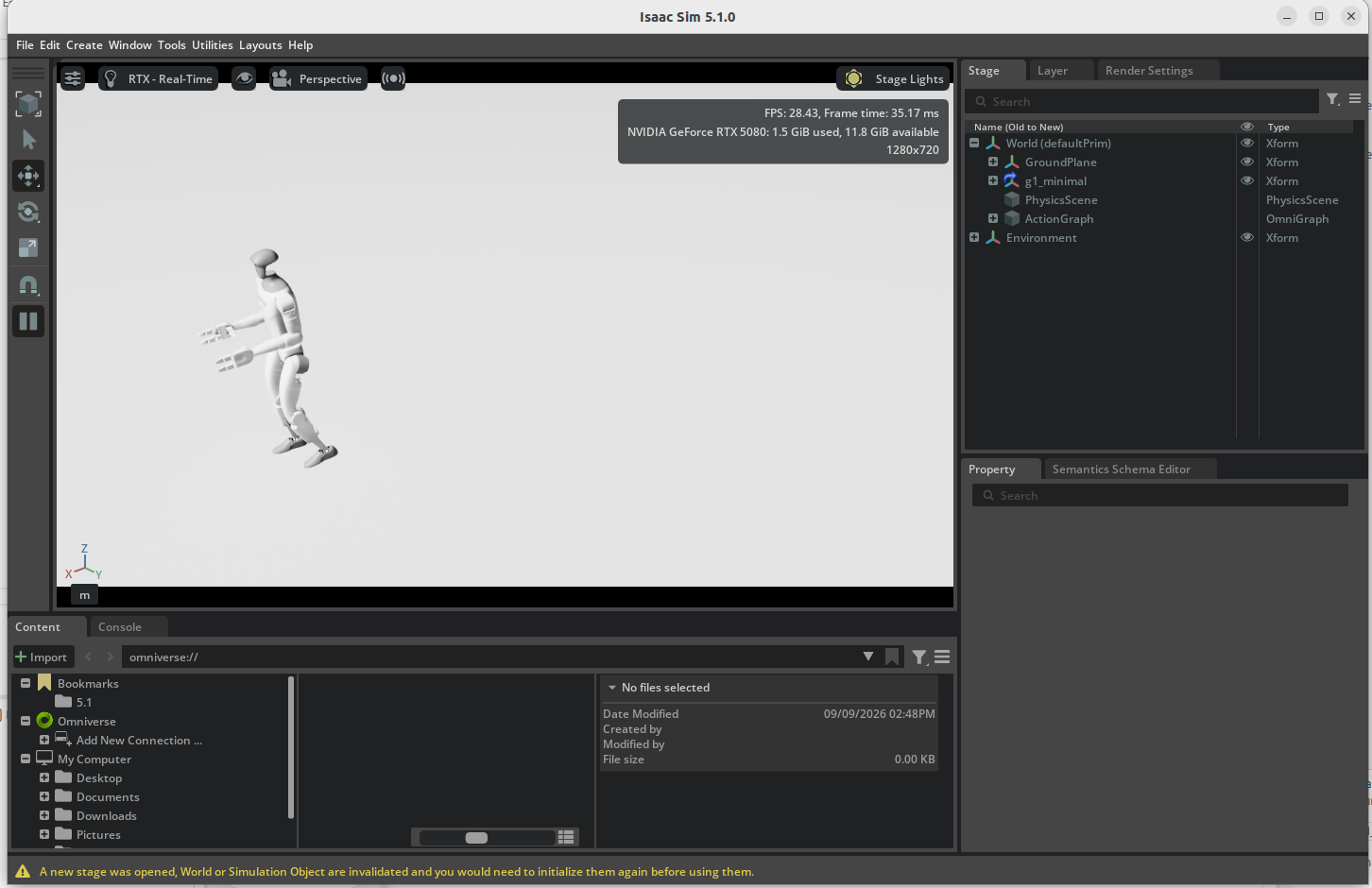
어쨌건 실행은 된다. 문제는 아직 ROS2로 토픽을 확인해보면 아무것도 뜨는게 없다는것이다. 천천히 수정해나가자. 지금은 먼저 해야 할 것이 몇가지 있다.
USD파일의 설정을 확인하자.
아마, 이 과정은 확신이 있다면 건너뛸텐데 그래도 모르니 거쳐가도록 하자.
내가 만든 USD 파일 구조가 강화학습 가중치의 설정과 맞는지 확인하는 과정이다. sim과 lab을 연결해서 돌렸는데 이상하게 걷는다거나 하면 이 부분부터 점검해야 할 것이다.
내 경우도.. 설정 잘못했더니 다리찢기 하더라..ㅡ_ㅡ..
일단 확인용 코드를 넣어보자.
from isaaclab.app import AppLauncher

app_launcher = AppLauncher()
simulation_app = app_launcher.app

import omni.usd
from pxr import UsdPhysics

import isaaclab.sim as sim_utils
from isaaclab.sim import SimulationContext


USD_PATH = "/home/lairpeteryksong/KinematicSLAM/isaacsim_tutorial/tutorial_2.usd"


# ---------------------------------------------------------
# 1. Simulation
# ---------------------------------------------------------
sim_cfg = sim_utils.SimulationCfg(
    dt=0.005,
    device="cuda:0",
)

sim = SimulationContext(sim_cfg)


# ---------------------------------------------------------
# 2. Open USD
# ---------------------------------------------------------
omni.usd.get_context().open_stage(USD_PATH)

stage = omni.usd.get_context().get_stage()

print("\n=== ARTICULATION ROOT CANDIDATES ===")

for prim in stage.Traverse():
    if prim.HasAPI(UsdPhysics.ArticulationRootAPI):
        print(prim.GetPath())


# ---------------------------------------------------------
# 3. Reset
# ---------------------------------------------------------
sim.reset()

print("[INFO] USD loaded successfully.")
print("[INFO] Simulation running.")


while simulation_app.is_running():
    sim.step()


simulation_app.close()
코드에서 가장 큰 변경점이 보이는건 Open USD파트부분일 것이다.
# ---------------------------------------------------------
# 2. Open USD
# ---------------------------------------------------------
omni.usd.get_context().open_stage(USD_PATH)

stage = omni.usd.get_context().get_stage()

print("\n=== ARTICULATION ROOT CANDIDATES ===")

for prim in stage.Traverse():
    if prim.HasAPI(UsdPhysics.ArticulationRootAPI):
        print(prim.GetPath())
이 코드를 통해 prim 정보를 화면에 출력하게 된다.
결과를 보자.
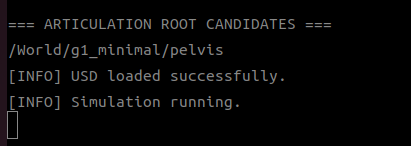
Articulation(관절구조체) 중심이 어딘지 찾아봤는데, 역시나 Isaacsim에서 작업할때 확인한 경우는 알겠지만, 골반(pelvis)에 있다… 역시 허린가.
관절 중심을 확인했으니, 다시 스크립트 코드를 수정해보자.
from isaaclab.app import AppLauncher

app_launcher = AppLauncher()
simulation_app = app_launcher.app

import omni.usd

import isaaclab.sim as sim_utils
from isaaclab.sim import SimulationContext
from isaaclab.assets import Articulation
from isaaclab_assets import G1_CFG


USD_PATH = "/home/lairpeteryksong/KinematicSLAM/isaacsim_tutorial/tutorial_2.usd"
G1_PRIM_PATH = "/World/g1_minimal/pelvis"


# ---------------------------------------------------------
# 1. 먼저 USD stage를 연다
# ---------------------------------------------------------
print("[INFO] Opening USD stage...")
omni.usd.get_context().open_stage(USD_PATH)

stage = omni.usd.get_context().get_stage()

if not stage:
    raise RuntimeError("Failed to open USD stage")

print("[INFO] USD stage opened.")


# ---------------------------------------------------------
# 2. 그 다음 SimulationContext 생성
# ---------------------------------------------------------
sim_cfg = sim_utils.SimulationCfg(
    dt=0.005,
    device="cuda:0",
)

sim = SimulationContext(sim_cfg)


# ---------------------------------------------------------
# 3. 기존 USD의 G1에 bind
# ---------------------------------------------------------
robot_cfg = G1_CFG.replace(
    prim_path=G1_PRIM_PATH,
    spawn=None,
)

robot = Articulation(robot_cfg)


# ---------------------------------------------------------
# 4. Physics / articulation 초기화
# ---------------------------------------------------------
print("[INFO] Resetting simulation...")
sim.reset()


# ---------------------------------------------------------
# 5. G1 정보 확인
# ---------------------------------------------------------
print("\n================ G1 ARTICULATION ================")
print("Prim path :", G1_PRIM_PATH)
print("Num joints:", robot.num_joints)
print("Num bodies:", robot.num_bodies)

print("\n=== JOINT NAMES ===")
for i, name in enumerate(robot.joint_names):
    print(f"{i:2d}: {name}")

print("\n=== BODY NAMES ===")
for i, name in enumerate(robot.body_names):
    print(f"{i:2d}: {name}")

print("=================================================\n")


# ---------------------------------------------------------
# 6. Simulation loop
# ---------------------------------------------------------
while simulation_app.is_running():
    sim.step()
    robot.update(sim.get_physics_dt())


simulation_app.close()
중간에 에러가 발생해서, 코드의 순서가 바뀌었다. SimulationCfg 의 선언 순서가 USD파일 로드 직후로 바뀌었다.
출력결과는 다음과 같다.
================ G1 ARTICULATION ================
Prim path : /World/g1_minimal/pelvis
Num joints: 37
Num bodies: 44

=== JOINT NAMES ===
 0: left_hip_pitch_joint
 1: right_hip_pitch_joint
 2: torso_joint
 3: left_hip_roll_joint
 4: right_hip_roll_joint
 5: left_shoulder_pitch_joint
 6: right_shoulder_pitch_joint
 7: left_hip_yaw_joint
 8: right_hip_yaw_joint
 9: left_shoulder_roll_joint
10: right_shoulder_roll_joint
11: left_knee_joint
12: right_knee_joint
13: left_shoulder_yaw_joint
14: right_shoulder_yaw_joint
15: left_ankle_pitch_joint
16: right_ankle_pitch_joint
17: left_elbow_pitch_joint
18: right_elbow_pitch_joint
19: left_ankle_roll_joint
20: right_ankle_roll_joint
21: left_elbow_roll_joint
22: right_elbow_roll_joint
23: left_five_joint
24: left_three_joint
25: left_zero_joint
26: right_five_joint
27: right_three_joint
28: right_zero_joint
29: left_six_joint
30: left_four_joint
31: left_one_joint
32: right_six_joint
33: right_four_joint
34: right_one_joint
35: left_two_joint
36: right_two_joint

=== BODY NAMES ===
 0: pelvis
 1: left_hip_pitch_link
 2: pelvis_contour_link
 3: right_hip_pitch_link
 4: torso_link
 5: left_hip_roll_link
 6: right_hip_roll_link
 7: head_link
 8: imu_link
 9: left_shoulder_pitch_link
10: logo_link
11: right_shoulder_pitch_link
12: left_hip_yaw_link
13: right_hip_yaw_link
14: left_shoulder_roll_link
15: right_shoulder_roll_link
16: left_knee_link
17: right_knee_link
18: left_shoulder_yaw_link
19: right_shoulder_yaw_link
20: left_ankle_pitch_link
21: right_ankle_pitch_link
22: left_elbow_pitch_link
23: right_elbow_pitch_link
24: left_ankle_roll_link
25: right_ankle_roll_link
26: left_elbow_roll_link
27: right_elbow_roll_link
28: left_palm_link
29: right_palm_link
30: left_five_link
31: left_three_link
32: left_zero_link
33: right_five_link
34: right_three_link
35: right_zero_link
36: left_six_link
37: left_four_link
38: left_one_link
39: right_six_link
40: right_four_link
41: right_one_link
42: left_two_link
43: right_two_link
=================================================
이제, 강화학습 가중치, 즉 checkpoint와 비교해보자.
스크립트 하나를 더 만들어보자. 파일명은 g1_policy_structure.py다.
from isaaclab.app import AppLauncher

app_launcher = AppLauncher()
simulation_app = app_launcher.app

import gymnasium as gym

import isaaclab_tasks  # noqa: F401
from isaaclab_tasks.utils import parse_env_cfg


TASK = "Isaac-Velocity-Flat-G1-Play-v0"


# ---------------------------------------------------------
# 1. Load task configuration
# ---------------------------------------------------------
env_cfg = parse_env_cfg(
    TASK,
    device="cuda:0",
    num_envs=1,
)


# ---------------------------------------------------------
# 2. Create environment
# ---------------------------------------------------------
env = gym.make(
    TASK,
    cfg=env_cfg,
)

base_env = env.unwrapped
robot = base_env.scene["robot"]


# ---------------------------------------------------------
# 3. Robot structure
# ---------------------------------------------------------
print("\n================ TRAINING G1 ================")

print("Num joints:", robot.num_joints)
print("Num bodies:", robot.num_bodies)

print("\n=== JOINT NAMES ===")
for i, name in enumerate(robot.joint_names):
    print(f"{i:2d}: {name}")


# ---------------------------------------------------------
# 4. Action manager
# ---------------------------------------------------------
print("\n=== ACTION MANAGER ===")
print(base_env.action_manager)

print("\n=== ACTION TERMS ===")
print("Terms:", base_env.action_manager.active_terms)


for term_name in base_env.action_manager.active_terms:

    term = base_env.action_manager.get_term(term_name)

    print(f"\n--- {term_name} ---")

    if hasattr(term, "_joint_ids"):
        print("joint ids:")
        print(term._joint_ids)

    if hasattr(term, "_joint_names"):
        print("joint names:")
        print(term._joint_names)


print("\nPolicy action dimension:")
print(base_env.action_manager.total_action_dim)

print("=============================================\n")


env.close()
simulation_app.close()
실행결과는 다음과 같다.
+------------------------------------------------+
|              Active Command Terms              |
+-------+---------------+------------------------+
| Index | Name          |          Type          |
+-------+---------------+------------------------+
|   0   | base_velocity | UniformVelocityCommand |
+-------+---------------+------------------------+

[INFO] Event Manager:  <EventManager> contains 2 active terms.
+--------------------------------------+
| Active Event Terms in Mode: 'startup' |
+----------+---------------------------+
|  Index   | Name                      |
+----------+---------------------------+
|    0     | physics_material          |
+----------+---------------------------+
+-------------------------------------+
| Active Event Terms in Mode: 'reset' |
+---------+---------------------------+
|  Index  | Name                      |
+---------+---------------------------+
|    0    | reset_base                |
|    1    | reset_robot_joints        |
+---------+---------------------------+

[INFO] Recorder Manager:  <RecorderManager> contains 0 active terms.
+---------------------+
| Active Recorder Terms |
+-----------+---------+
|   Index   | Name    |
+-----------+---------+
+-----------+---------+

[INFO] Action Manager:  <ActionManager> contains 1 active terms.
+------------------------------------+
|  Active Action Terms (shape: 37)   |
+--------+-------------+-------------+
| Index  | Name        |   Dimension |
+--------+-------------+-------------+
|   0    | joint_pos   |          37 |
+--------+-------------+-------------+

[INFO] Observation Manager: <ObservationManager> contains 1 groups.
+---------------------------------------------------------+
| Active Observation Terms in Group: 'policy' (shape: (123,)) |
+-----------+---------------------------------+-----------+
|   Index   | Name                            |   Shape   |
+-----------+---------------------------------+-----------+
|     0     | base_lin_vel                    |    (3,)   |
|     1     | base_ang_vel                    |    (3,)   |
|     2     | projected_gravity               |    (3,)   |
|     3     | velocity_commands               |    (3,)   |
|     4     | joint_pos                       |   (37,)   |
|     5     | joint_vel                       |   (37,)   |
|     6     | actions                         |   (37,)   |
+-----------+---------------------------------+-----------+

[INFO] Termination Manager:  <TerminationManager> contains 2 active terms.
+---------------------------------+
|     Active Termination Terms    |
+-------+--------------+----------+
| Index | Name         | Time Out |
+-------+--------------+----------+
|   0   | time_out     |   True   |
|   1   | base_contact |  False   |
+-------+--------------+----------+

[INFO] Reward Manager:  <RewardManager> contains 16 active terms.
+------------------------------------------+
|           Active Reward Terms            |
+-------+-------------------------+--------+
| Index | Name                    | Weight |
+-------+-------------------------+--------+
|   0   | track_lin_vel_xy_exp    |    1.0 |
|   1   | track_ang_vel_z_exp     |    1.0 |
|   2   | lin_vel_z_l2            |   -0.2 |
|   3   | ang_vel_xy_l2           |  -0.05 |
|   4   | dof_torques_l2          | -2e-06 |
|   5   | dof_acc_l2              | -1e-07 |
|   6   | action_rate_l2          | -0.005 |
|   7   | feet_air_time           |   0.75 |
|   8   | flat_orientation_l2     |   -1.0 |
|   9   | dof_pos_limits          |   -1.0 |
|   10  | termination_penalty     | -200.0 |
|   11  | feet_slide              |   -0.1 |
|   12  | joint_deviation_hip     |   -0.1 |
|   13  | joint_deviation_arms    |   -0.1 |
|   14  | joint_deviation_fingers |  -0.05 |
|   15  | joint_deviation_torso   |   -0.1 |
+-------+-------------------------+--------+

[INFO] Curriculum Manager:  <CurriculumManager> contains 0 active terms.
+----------------------+
| Active Curriculum Terms |
+-----------+----------+
|   Index   | Name     |
+-----------+----------+
+-----------+----------+

Creating window for environment.
[INFO]: Completed setting up the environment...

================ TRAINING G1 ================
Num joints: 37
Num bodies: 44

=== JOINT NAMES ===
 0: left_hip_pitch_joint
 1: right_hip_pitch_joint
 2: torso_joint
 3: left_hip_roll_joint
 4: right_hip_roll_joint
 5: left_shoulder_pitch_joint
 6: right_shoulder_pitch_joint
 7: left_hip_yaw_joint
 8: right_hip_yaw_joint
 9: left_shoulder_roll_joint
10: right_shoulder_roll_joint
11: left_knee_joint
12: right_knee_joint
13: left_shoulder_yaw_joint
14: right_shoulder_yaw_joint
15: left_ankle_pitch_joint
16: right_ankle_pitch_joint
17: left_elbow_pitch_joint
18: right_elbow_pitch_joint
19: left_ankle_roll_joint
20: right_ankle_roll_joint
21: left_elbow_roll_joint
22: right_elbow_roll_joint
23: left_five_joint
24: left_three_joint
25: left_zero_joint
26: right_five_joint
27: right_three_joint
28: right_zero_joint
29: left_six_joint
30: left_four_joint
31: left_one_joint
32: right_six_joint
33: right_four_joint
34: right_one_joint
35: left_two_joint
36: right_two_joint

=== ACTION MANAGER ===
<ActionManager> contains 1 active terms.
+------------------------------------+
|  Active Action Terms (shape: 37)   |
+--------+-------------+-------------+
| Index  | Name        |   Dimension |
+--------+-------------+-------------+
|   0    | joint_pos   |          37 |
+--------+-------------+-------------+


=== ACTION TERMS ===
Terms: ['joint_pos']

--- joint_pos ---
joint ids:
slice(None, None, None)
joint names:
['left_hip_pitch_joint', 'right_hip_pitch_joint', 'torso_joint', 'left_hip_roll_joint', 'right_hip_roll_joint', 'left_shoulder_pitch_joint', 'right_shoulder_pitch_joint', 'left_hip_yaw_joint', 'right_hip_yaw_joint', 'left_shoulder_roll_joint', 'right_shoulder_roll_joint', 'left_knee_joint', 'right_knee_joint', 'left_shoulder_yaw_joint', 'right_shoulder_yaw_joint', 'left_ankle_pitch_joint', 'right_ankle_pitch_joint', 'left_elbow_pitch_joint', 'right_elbow_pitch_joint', 'left_ankle_roll_joint', 'right_ankle_roll_joint', 'left_elbow_roll_joint', 'right_elbow_roll_joint', 'left_five_joint', 'left_three_joint', 'left_zero_joint', 'right_five_joint', 'right_three_joint', 'right_zero_joint', 'left_six_joint', 'left_four_joint', 'left_one_joint', 'right_six_joint', 'right_four_joint', 'right_one_joint', 'left_two_joint', 'right_two_joint']

Policy action dimension:
37
=============================================

[28.154s] Simulation App Shutting Down
위의 두가지 결과를 정리해서 표로 바꿔보면 이렇다.
| 번호 | USD파일 | Checkpoint |
|---|---|---|
| 0 | left_hip_pitch_joint | left_hip_pitch_joint |
| 1 | right_hip_pitch_joint | right_hip_pitch_joint |
| 2 | torso_joint | torso_joint |
| 3 | left_hip_roll_joint | left_hip_roll_joint |
| 4 | right_hip_roll_joint | right_hip_roll_joint |
| 5 | left_shoulder_pitch_joint | left_shoulder_pitch_joint |
| 6 | right_shoulder_pitch_joint | right_shoulder_pitch_joint |
| 7 | left_hip_yaw_joint | left_hip_yaw_joint |
| 8 | right_hip_yaw_joint | right_hip_yaw_joint |
| 9 | left_shoulder_roll_joint | left_shoulder_roll_joint |
| 10 | right_shoulder_roll_joint | right_shoulder_roll_joint |
| 11 | left_knee_joint | left_knee_joint |
| 12 | right_knee_joint | right_knee_joint |
| 13 | left_shoulder_yaw_joint | left_shoulder_yaw_joint |
| 14 | right_shoulder_yaw_joint | right_shoulder_yaw_joint |
| 15 | left_ankle_pitch_joint | left_ankle_pitch_joint |
| 16 | right_ankle_pitch_joint | right_ankle_pitch_joint |
| 17 | left_elbow_pitch_joint | left_elbow_pitch_joint |
| 18 | right_elbow_pitch_joint | right_elbow_pitch_joint |
| 19 | left_ankle_roll_joint | left_ankle_roll_joint |
| 20 | right_ankle_roll_joint | right_ankle_roll_joint |
| 21 | left_elbow_roll_joint | left_elbow_roll_joint |
| 22 | right_elbow_roll_joint | right_elbow_roll_joint |
| 23 | left_five_joint | left_five_joint |
| 24 | left_three_joint | left_three_joint |
| 25 | left_zero_joint | left_zero_joint |
| 26 | right_five_joint | right_five_joint |
| 27 | right_three_joint | right_three_joint |
| 28 | right_zero_joint | right_zero_joint |
| 29 | left_six_joint | left_six_joint |
| 30 | left_four_joint | left_four_joint |
| 31 | left_one_joint | left_one_joint |
| 32 | right_six_joint | right_six_joint |
| 33 | right_four_joint | right_four_joint |
| 34 | right_one_joint | right_one_joint |
| 35 | left_two_joint | left_two_joint |
| 36 | right_two_joint | right_two_joint |
이로써 USD 파일과 Checkpoint 파일의 구성이 동일함을 확인했다.
Policy 파일 연결하기.
USD 파일점검을 했듯이. 이번엔 Policy 파일도 점검해보자.
우선 checkpoint 파일이 어디저장된걸 쓰는지 확인해보자.
find ~ -type f -name "*.pt" 2>/dev/null | grep -i g1
제법 여러개가 보일텐데, 후보를 압축해보면 다음과 같다.
~/isaacsim/Assets/Isaac/5.1/Isaac/IsaacLab/PretrainedCheckpoints/rsl_rl/Isaac-Velocity-Flat-G1-v0/checkpoint.pt
~/IsaacLab/.pretrained_checkpoints/rsl_rl/Isaac-Velocity-Flat-G1-v0/checkpoint.pt
~/IsaacLab/.pretrained_checkpoints/rsl_rl/Isaac-Velocity-Flat-G1-v0/exported/policy.pt
하나는 Isaacsim을 설치하면서 받아진 강화학습용 버전이고(첫번째),
다른 하나는 IsaacLab에서 실행과정에서 다운로드 받은 파일(두번째, 세번째)인데,
checkpoint.pt는 RSL-RL runner/model state 전체를 담고 있고, exported/policy.pt는 inference용 TorchScript policy인 경우가 많다. 따라서, 여기선 policy.pt만 가져다 쓰는 방식으로 가닥을 잡아보자.
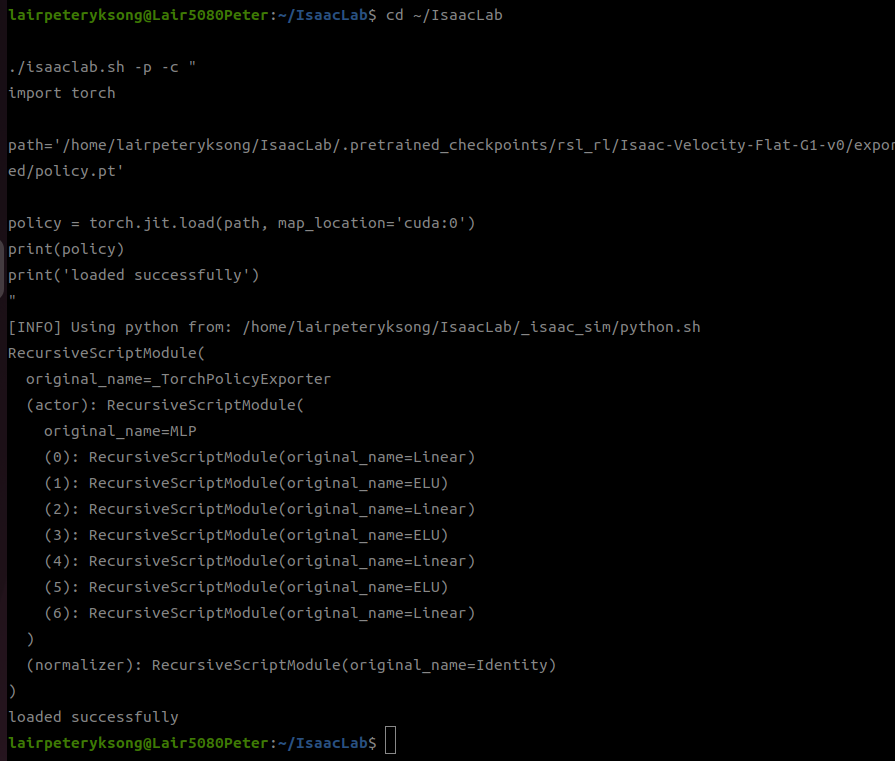
해당 policy 파일이 torch인지 확인하기 위해 아래 명령을 실행시켜 확인해보자.
cd ~/IsaacLab

./isaaclab.sh -p -c "
import torch

path='/home/lairpeteryksong/IsaacLab/.pretrained_checkpoints/rsl_rl/Isaac-Velocity-Flat-G1-v0/exported/policy.pt'

policy = torch.jit.load(path, map_location='cuda:0')
print(policy)
print('loaded successfully')
"
실행결과를 통해 이게 torch로 불러들일 수 있는 파일임을 확인할수 있다.
차원 검증
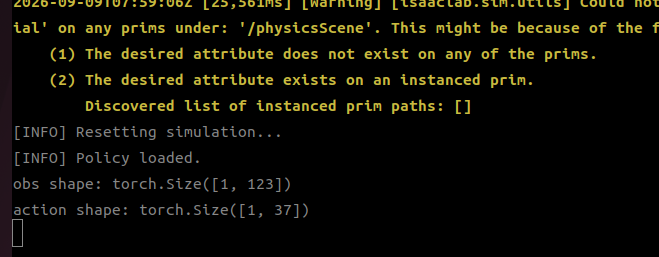
observation 123차원 → policy → action 37차원이 정상인지 검증하자.
g1_usd_test.py 파일에 다음 코드를 집어 넣자.
import torch
import math
POLICY_PATH = (
    "/home/lairpeteryksong/IsaacLab/.pretrained_checkpoints/"
    "rsl_rl/Isaac-Velocity-Flat-G1-v0/exported/policy.pt"
)
그리고 sim.reset이후에 policy를 로드하자. policy를 불러들이면서, 초기값도 넣어둔다.
policy = torch.jit.load(
    POLICY_PATH,
    map_location="cuda:0",
)

policy.eval()

print("[INFO] Policy loaded.")


default_joint_pos = robot.data.default_joint_pos.clone()
previous_action = torch.zeros(
    (1, 37),
    device="cuda:0",
)

velocity_command = torch.tensor(
    [[0.0, 0.0, 0.0]],
    device="cuda:0",
)
그리고 시뮬레이션 루프를 다음과 같이 바꿔보자.
# ---------------------------------------------------------
# 6. Simulation loop
# ---------------------------------------------------------
while simulation_app.is_running():
    sim.step()
    robot.update(sim.get_physics_dt())

    # -----------------------------------------------------
    # Observation
    # -----------------------------------------------------

    base_lin_vel = robot.data.root_lin_vel_b
    base_ang_vel = robot.data.root_ang_vel_b

    projected_gravity = robot.data.projected_gravity_b

    joint_pos = robot.data.joint_pos - default_joint_pos
    joint_vel = robot.data.joint_vel

    obs = torch.cat(
        (
            base_lin_vel,
            base_ang_vel,
            projected_gravity,
            velocity_command,
            joint_pos,
            joint_vel,
            previous_action,
        ),
        dim=-1,
    )

    print("obs shape:", obs.shape)

    # -----------------------------------------------------
    # Policy inference
    # -----------------------------------------------------

    with torch.inference_mode():
        action = policy(obs)

    print("action shape:", action.shape)

    previous_action[:] = action

    break


simulation_app.close()
실행 결과는 다음과 같다.
Policy 파일 설계 확인.
다음 코드를 넣어 앞서서 설정확인할때처럼 한번 실행시켜보자.
from isaaclab.app import AppLauncher

# ---------------------------------------------------------
# 0. Launch Isaac Sim / Isaac Lab app
# ---------------------------------------------------------
app_launcher = AppLauncher()
simulation_app = app_launcher.app


# ---------------------------------------------------------
# Imports after AppLauncher
# ---------------------------------------------------------
import gymnasium as gym

import isaaclab_tasks  # noqa: F401
from isaaclab_tasks.utils import parse_env_cfg


TASK = "Isaac-Velocity-Flat-G1-Play-v0"


# ---------------------------------------------------------
# 1. Load environment configuration
# ---------------------------------------------------------
env_cfg = parse_env_cfg(
    TASK,
    device="cuda:0",
    num_envs=1,
)

print("\n================ ENV CONFIG ================")

print("Task:", TASK)
print("sim dt:", env_cfg.sim.dt)
print("decimation:", env_cfg.decimation)
print("policy dt:", env_cfg.sim.dt * env_cfg.decimation)

print("============================================\n")


# ---------------------------------------------------------
# 2. Create environment
# ---------------------------------------------------------
env = gym.make(
    TASK,
    cfg=env_cfg,
)

base_env = env.unwrapped


# ---------------------------------------------------------
# 3. Get robot
# ---------------------------------------------------------
robot = base_env.scene["robot"]


# ---------------------------------------------------------
# 4. Print robot structure
# ---------------------------------------------------------
print("\n================ TRAINING G1 ================")

print("Num joints:", robot.num_joints)
print("Num bodies:", robot.num_bodies)

print("\n=== JOINT NAMES ===")

for i, name in enumerate(robot.joint_names):
    print(f"{i:2d}: {name}")

print("\n=== BODY NAMES ===")

for i, name in enumerate(robot.body_names):
    print(f"{i:2d}: {name}")

print("=============================================\n")


# ---------------------------------------------------------
# 5. Action Manager
# ---------------------------------------------------------
print("\n================ ACTION MANAGER ================")

print(base_env.action_manager)

print("\nActive terms:")
print(base_env.action_manager.active_terms)

print("\nTotal action dimension:")
print(base_env.action_manager.total_action_dim)

print("================================================\n")


# ---------------------------------------------------------
# 6. Print action terms
# ---------------------------------------------------------
print("\n================ ACTION TERMS =================")

for term_name in base_env.action_manager.active_terms:

    term = base_env.action_manager.get_term(term_name)

    print(f"\n--- {term_name} ---")

    if hasattr(term, "_joint_ids"):
        print("joint ids:")
        print(term._joint_ids)

    if hasattr(term, "_joint_names"):
        print("joint names:")
        print(term._joint_names)

    if hasattr(term, "action_dim"):
        print("action dimension:")
        print(term.action_dim)

print("================================================\n")


# ---------------------------------------------------------
# 7. Joint position action configuration
# ---------------------------------------------------------
print("\n========== JOINT POSITION ACTION CONFIG ==========")

joint_action_cfg = env_cfg.actions.joint_pos

# Full config first
print("\nFull config:")
print(joint_action_cfg)


# Individual attributes
print("\n--- individual parameters ---")

if hasattr(joint_action_cfg, "scale"):
    print("scale:")
    print(joint_action_cfg.scale)
else:
    print("scale: <attribute not available>")

if hasattr(joint_action_cfg, "offset"):
    print("offset:")
    print(joint_action_cfg.offset)
else:
    print("offset: <attribute not available>")

if hasattr(joint_action_cfg, "use_default_offset"):
    print("use_default_offset:")
    print(joint_action_cfg.use_default_offset)
else:
    print("use_default_offset: <attribute not available>")

if hasattr(joint_action_cfg, "joint_names"):
    print("joint_names:")
    print(joint_action_cfg.joint_names)
else:
    print("joint_names: <attribute not available>")

print("==================================================\n")


# ---------------------------------------------------------
# 8. Runtime action-term internals
# ---------------------------------------------------------
print("\n========== RUNTIME JOINT ACTION TERM ==========")

joint_action_term = base_env.action_manager.get_term("joint_pos")

print("Type:")
print(type(joint_action_term))


if hasattr(joint_action_term, "_scale"):
    print("\nruntime scale:")
    print(joint_action_term._scale)

if hasattr(joint_action_term, "_offset"):
    print("\nruntime offset:")
    print(joint_action_term._offset)

if hasattr(joint_action_term, "_joint_ids"):
    print("\nruntime joint ids:")
    print(joint_action_term._joint_ids)

if hasattr(joint_action_term, "_joint_names"):
    print("\nruntime joint names:")
    print(joint_action_term._joint_names)

print("===============================================\n")


# ---------------------------------------------------------
# 9. Observation structure
# ---------------------------------------------------------
print("\n================ OBSERVATION MANAGER ================")

print(base_env.observation_manager)

print("\nPolicy observation dimension:")

# Observation manager implementation can differ slightly,
# so print manager information rather than assuming internals.
try:
    print(base_env.observation_manager.group_obs_dim["policy"])
except Exception:
    print("Could not directly read group_obs_dim.")
    print("See Observation Manager table printed above.")

print("=====================================================\n")


# ---------------------------------------------------------
# 10. Summary
# ---------------------------------------------------------
print("\n================ SUMMARY =================")

print("Task                :", TASK)
print("Robot joints        :", robot.num_joints)
print("Robot bodies        :", robot.num_bodies)
print("Policy action dim   :", base_env.action_manager.total_action_dim)
print("Simulation dt       :", env_cfg.sim.dt)
print("Control decimation  :", env_cfg.decimation)
print("Policy/control dt   :", env_cfg.sim.dt * env_cfg.decimation)

print("==========================================\n")


# ---------------------------------------------------------
# 11. Cleanup
# ---------------------------------------------------------
env.close()
simulation_app.close()
실행결과는 다음과 같다.
========== RUNTIME JOINT ACTION TERM ==========
Type:
<class 'isaaclab.envs.mdp.actions.joint_actions.JointPositionAction'>

runtime scale:
0.5

runtime offset:
tensor([[-0.2000, -0.2000,  0.0000,  0.0000,  0.0000,  0.3500,  0.3500,  0.0000,
          0.0000,  0.1600, -0.1600,  0.4200,  0.4200,  0.0000,  0.0000, -0.2300,
         -0.2300,  0.8700,  0.8700,  0.0000,  0.0000,  0.0000,  0.0000,  0.0000,
          0.0000,  0.0000,  0.0000,  0.0000,  0.0000,  0.0000,  0.0000,  1.0000,
          0.0000,  0.0000, -1.0000,  0.5200, -0.5200]], device='cuda:0')

runtime joint ids:
slice(None, None, None)

runtime joint names:
['left_hip_pitch_joint', 'right_hip_pitch_joint', 'torso_joint', 'left_hip_roll_joint', 'right_hip_roll_joint', 'left_shoulder_pitch_joint', 'right_shoulder_pitch_joint', 'left_hip_yaw_joint', 'right_hip_yaw_joint', 'left_shoulder_roll_joint', 'right_shoulder_roll_joint', 'left_knee_joint', 'right_knee_joint', 'left_shoulder_yaw_joint', 'right_shoulder_yaw_joint', 'left_ankle_pitch_joint', 'right_ankle_pitch_joint', 'left_elbow_pitch_joint', 'right_elbow_pitch_joint', 'left_ankle_roll_joint', 'right_ankle_roll_joint', 'left_elbow_roll_joint', 'right_elbow_roll_joint', 'left_five_joint', 'left_three_joint', 'left_zero_joint', 'right_five_joint', 'right_three_joint', 'right_zero_joint', 'left_six_joint', 'left_four_joint', 'left_one_joint', 'right_six_joint', 'right_four_joint', 'right_one_joint', 'left_two_joint', 'right_two_joint']
===============================================


================ OBSERVATION MANAGER ================
<ObservationManager> contains 1 groups.
+---------------------------------------------------------+
| Active Observation Terms in Group: 'policy' (shape: (123,)) |
+-----------+---------------------------------+-----------+
|   Index   | Name                            |   Shape   |
+-----------+---------------------------------+-----------+
|     0     | base_lin_vel                    |    (3,)   |
|     1     | base_ang_vel                    |    (3,)   |
|     2     | projected_gravity               |    (3,)   |
|     3     | velocity_commands               |    (3,)   |
|     4     | joint_pos                       |   (37,)   |
|     5     | joint_vel                       |   (37,)   |
|     6     | actions                         |   (37,)   |
+-----------+---------------------------------+-----------+


Policy observation dimension:
(123,)
=====================================================


================ SUMMARY =================
Task                : Isaac-Velocity-Flat-G1-Play-v0
Robot joints        : 37
Robot bodies        : 44
Policy action dim   : 37
Simulation dt       : 0.005
Control decimation  : 4
Policy/control dt   : 0.02
==========================================
핵심은 policy 업데이트가 50Hz로 일어난다는 것. 그리고 simulation dt가 0.005초라는 것 등등.
이걸 반영시켜서 g1_usd_test.py를 수정해보자.
Policy action dim   = 37
Observation dim     = 123

runtime scale       = 0.5
runtime offset      = 37차원 default joint pose

simulation dt       = 0.005
decimation          = 4
policy dt           = 0.02 s = 50 Hz
from isaaclab.app import AppLauncher

app_launcher = AppLauncher()
simulation_app = app_launcher.app

import omni.usd
import torch

import isaaclab.sim as sim_utils
from isaaclab.sim import SimulationContext
from isaaclab.assets import Articulation
from isaaclab_assets import G1_CFG


USD_PATH = "/home/lairpeteryksong/KinematicSLAM/isaacsim_tutorial/tutorial_2.usd"
G1_PRIM_PATH = "/World/g1_minimal/pelvis"

POLICY_PATH = (
    "/home/lairpeteryksong/IsaacLab/.pretrained_checkpoints/"
    "rsl_rl/Isaac-Velocity-Flat-G1-v0/exported/policy.pt"
)

SIM_DT = 0.005
DECIMATION = 4
ACTION_SCALE = 0.5
DEVICE = "cuda:0"


# ---------------------------------------------------------
# 1. Open existing USD
# ---------------------------------------------------------
print("[INFO] Opening USD stage...")

omni.usd.get_context().open_stage(USD_PATH)

stage = omni.usd.get_context().get_stage()

if stage is None:
    raise RuntimeError("Failed to open USD stage.")

print("[INFO] USD stage opened.")


# ---------------------------------------------------------
# 2. Simulation
# ---------------------------------------------------------
sim_cfg = sim_utils.SimulationCfg(
    dt=SIM_DT,
    device=DEVICE,
)

sim = SimulationContext(sim_cfg)


# ---------------------------------------------------------
# 3. Bind existing G1
# ---------------------------------------------------------
robot_cfg = G1_CFG.replace(
    prim_path=G1_PRIM_PATH,
    spawn=None,
)

robot = Articulation(robot_cfg)


# ---------------------------------------------------------
# 4. Initialize
# ---------------------------------------------------------
print("[INFO] Resetting simulation...")
sim.reset()


# ---------------------------------------------------------
# 5. Load policy
# ---------------------------------------------------------
policy = torch.jit.load(
    POLICY_PATH,
    map_location=DEVICE,
)

policy.eval()

print("[INFO] Policy loaded.")


# ---------------------------------------------------------
# 6. Training default pose / action offset
# ---------------------------------------------------------
joint_offset = torch.tensor(
    [
        -0.20, -0.20,  0.00,
         0.00,  0.00,
         0.35,  0.35,
         0.00,  0.00,
         0.16, -0.16,
         0.42,  0.42,
         0.00,  0.00,
        -0.23, -0.23,
         0.87,  0.87,
         0.00,  0.00,
         0.00,  0.00,
         0.00,  0.00,  0.00,
         0.00,  0.00,  0.00,
         0.00,  0.00,  1.00,
         0.00,  0.00, -1.00,
         0.52, -0.52,
    ],
    device=DEVICE,
    dtype=torch.float32,
).unsqueeze(0)

joint_vel_init = torch.zeros_like(joint_offset)


# ---------------------------------------------------------
# 7. IMPORTANT:
#    Put G1 into the policy's expected initial joint pose
# ---------------------------------------------------------
robot.write_joint_state_to_sim(
    joint_offset,
    joint_vel_init,
)

robot.set_joint_position_target(joint_offset)

# 실제 simulator에 command를 전달
robot.write_data_to_sim()


# ---------------------------------------------------------
# 8. Stationary velocity command
# ---------------------------------------------------------
velocity_command = torch.tensor(
    [[0.0, 0.0, 0.0]],
    device=DEVICE,
    dtype=torch.float32,
)

previous_action = torch.zeros(
    (1, 37),
    device=DEVICE,
    dtype=torch.float32,
)


# ---------------------------------------------------------
# 9. Refresh state after initialization
# ---------------------------------------------------------
sim.step()
robot.update(SIM_DT)


# ---------------------------------------------------------
# 10. Control loop
# ---------------------------------------------------------
physics_step = 0
joint_target = joint_offset.clone()

print("[INFO] Starting policy control")
print("[INFO] Physics rate :", 1.0 / SIM_DT, "Hz")
print("[INFO] Policy rate  :", 1.0 / (SIM_DT * DECIMATION), "Hz")


while simulation_app.is_running():

    # -----------------------------------------------------
    # Policy runs every 4 simulation steps = 50 Hz
    # -----------------------------------------------------
    if physics_step % DECIMATION == 0:

        base_lin_vel = robot.data.root_lin_vel_b
        base_ang_vel = robot.data.root_ang_vel_b
        projected_gravity = robot.data.projected_gravity_b

        joint_pos = robot.data.joint_pos - joint_offset
        joint_vel = robot.data.joint_vel

        obs = torch.cat(
            (
                base_lin_vel,          # 3
                base_ang_vel,          # 3
                projected_gravity,     # 3
                velocity_command,      # 3
                joint_pos,             # 37
                joint_vel,             # 37
                previous_action,       # 37
            ),
            dim=-1,
        )

        if obs.shape != (1, 123):
            raise RuntimeError(
                f"Observation dimension mismatch: {obs.shape}"
            )

        with torch.inference_mode():
            action = policy(obs)

        if action.shape != (1, 37):
            raise RuntimeError(
                f"Action dimension mismatch: {action.shape}"
            )

        # Same action transformation as the training task
        joint_target = joint_offset + ACTION_SCALE * action

        previous_action.copy_(action)


    # -----------------------------------------------------
    # Apply current target EVERY physics step
    # -----------------------------------------------------
    robot.set_joint_position_target(joint_target)

    # ★ 중요 ★
    # Isaac Lab command buffer → physics simulation
    robot.write_data_to_sim()

    # Physics
    sim.step()

    # Simulator → Isaac Lab state buffers
    robot.update(SIM_DT)

    physics_step += 1


simulation_app.close()
실행결과는 이렇다.
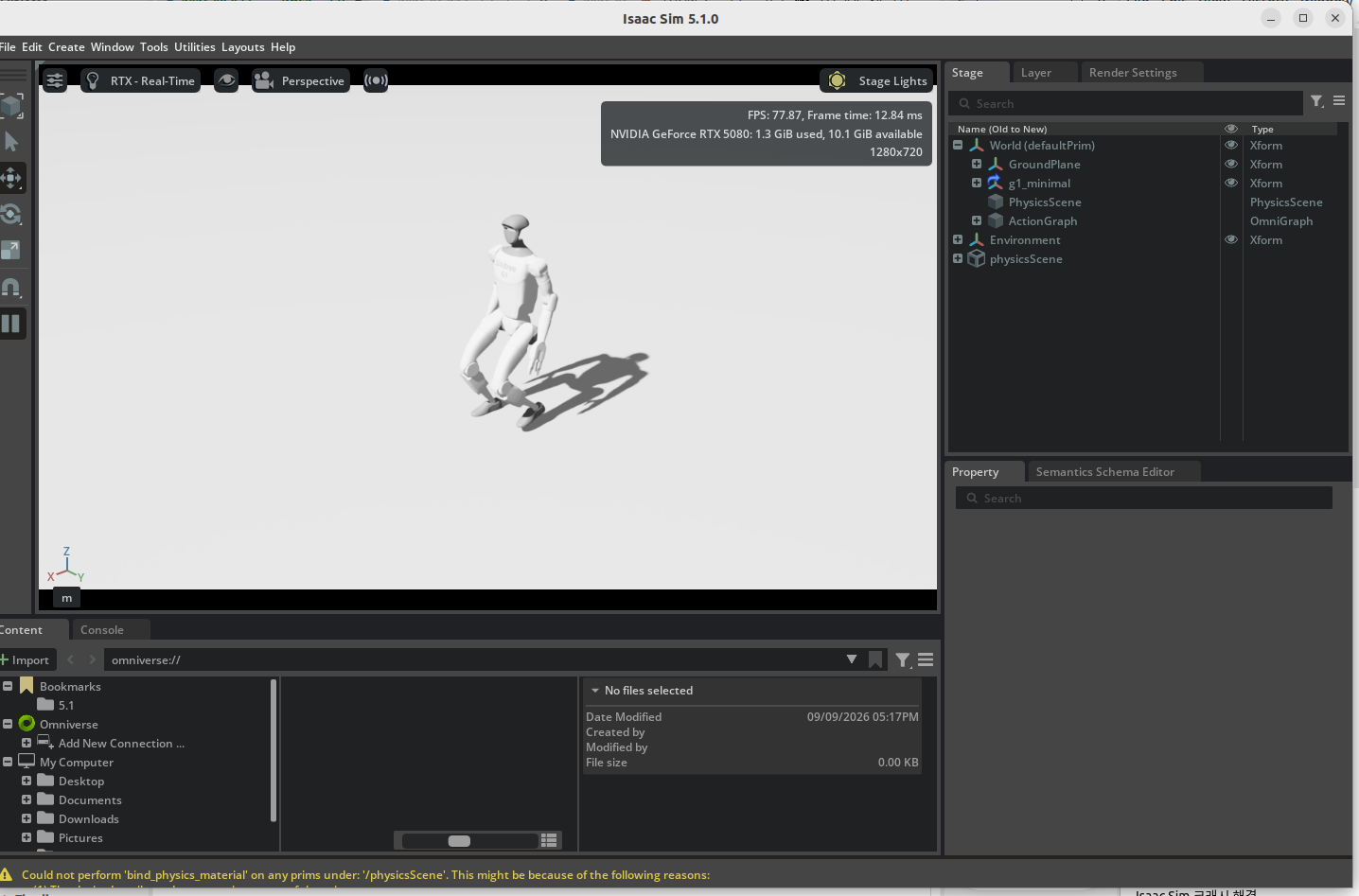
velocity_command 도 살짝 바꿔보자.
velocity_command = torch.tensor(
    [[0.5, 0.0, 0.0]],
    device=DEVICE,
    dtype=torch.float32,
실행하면 슬근슬근 움직이는걸 볼 수 있다.
TeleOp. 키보드 연결하기
이제 키보드에서 명령을 받아 움직이는 것으로 넘어가보자.
W / S : 전진 / 후진
A / D : 좌 / 우 측면 이동
Q / E : 좌 / 우 회전
Space : 정지
밑에 있는 코드대로 넣으면 아래 화면처럼 돌아갈 것이다. 디버그를 위해 키보드 커맨드가 어떤게 들어왔는지 확인할 수 있도록 되어있다.
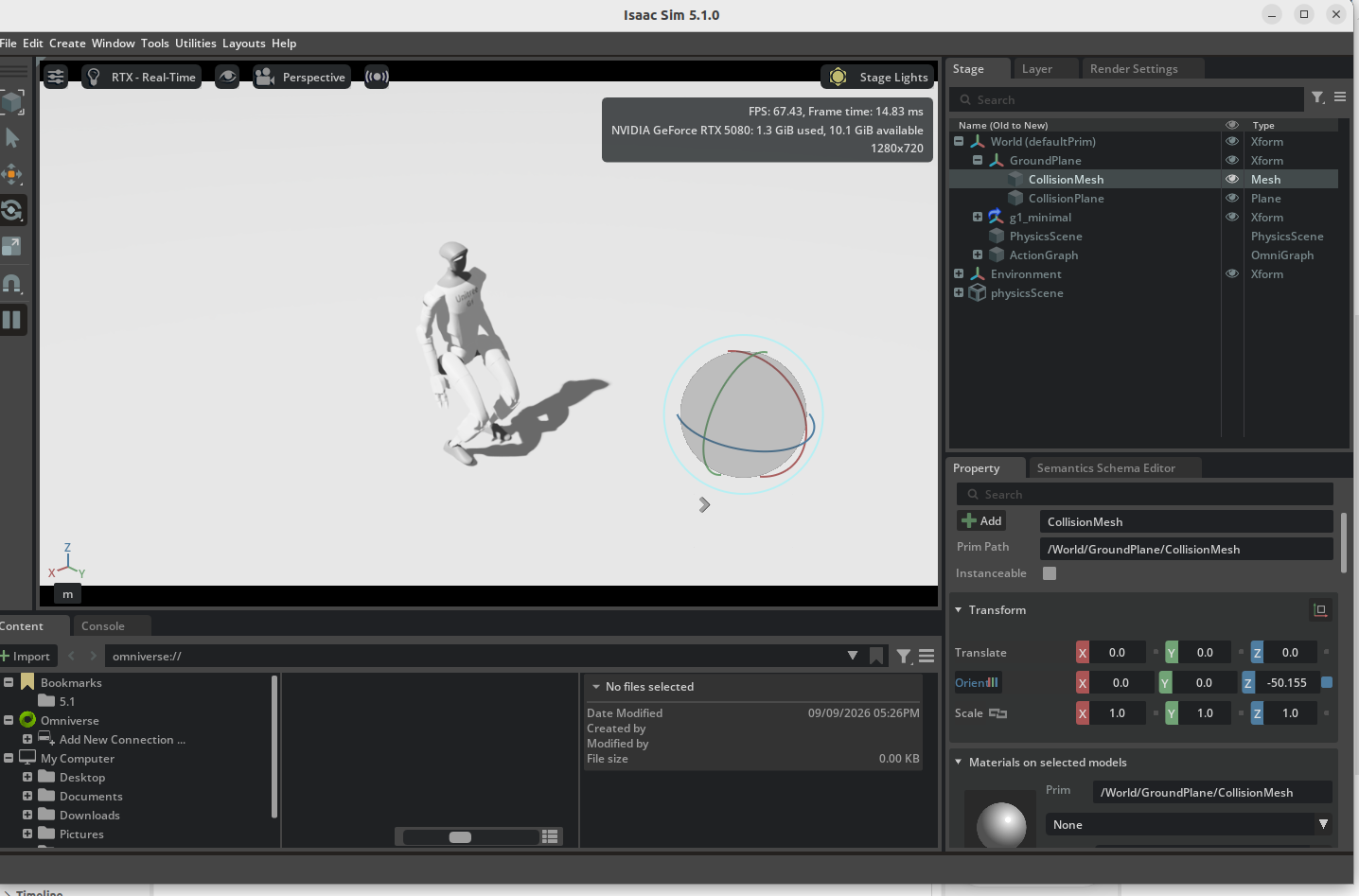
from isaaclab.app import AppLauncher

app_launcher = AppLauncher()
simulation_app = app_launcher.app

import omni.usd
import omni.appwindow

import carb
import torch

import isaaclab.sim as sim_utils
from isaaclab.sim import SimulationContext
from isaaclab.assets import Articulation
from isaaclab_assets import G1_CFG

USD_PATH = "/home/lairpeteryksong/KinematicSLAM/isaacsim_tutorial/tutorial_2.usd"
G1_PRIM_PATH = "/World/g1_minimal/pelvis"

POLICY_PATH = (
    "/home/lairpeteryksong/IsaacLab/.pretrained_checkpoints/"
    "rsl_rl/Isaac-Velocity-Flat-G1-v0/exported/policy.pt"
)

SIM_DT = 0.005
DECIMATION = 4
ACTION_SCALE = 0.5
DEVICE = "cuda:0"

LINEAR_SPEED = 0.5
LATERAL_SPEED = 0.3
YAW_SPEED = 0.5


# ---------------------------------------------------------
# 1. Open USD
# ---------------------------------------------------------
omni.usd.get_context().open_stage(USD_PATH)

stage = omni.usd.get_context().get_stage()

if stage is None:
    raise RuntimeError("Failed to open USD stage.")


# ---------------------------------------------------------
# 2. Simulation
# ---------------------------------------------------------
sim_cfg = sim_utils.SimulationCfg(
    dt=SIM_DT,
    device=DEVICE,
)

sim = SimulationContext(sim_cfg)


# ---------------------------------------------------------
# 3. G1 articulation
# ---------------------------------------------------------
robot_cfg = G1_CFG.replace(
    prim_path=G1_PRIM_PATH,
    spawn=None,
)

robot = Articulation(robot_cfg)

sim.reset()


# ---------------------------------------------------------
# 4. Policy
# ---------------------------------------------------------
policy = torch.jit.load(
    POLICY_PATH,
    map_location=DEVICE,
)

policy.eval()

print("[INFO] Policy loaded.")


# ---------------------------------------------------------
# 5. Default joint pose
# ---------------------------------------------------------
joint_offset = torch.tensor(
    [
        -0.20, -0.20,  0.00,
         0.00,  0.00,
         0.35,  0.35,
         0.00,  0.00,
         0.16, -0.16,
         0.42,  0.42,
         0.00,  0.00,
        -0.23, -0.23,
         0.87,  0.87,
         0.00,  0.00,
         0.00,  0.00,
         0.00,  0.00,  0.00,
         0.00,  0.00,  0.00,
         0.00,  0.00,  1.00,
         0.00,  0.00, -1.00,
         0.52, -0.52,
    ],
    device=DEVICE,
    dtype=torch.float32,
).unsqueeze(0)

joint_vel_init = torch.zeros_like(joint_offset)

robot.write_joint_state_to_sim(
    joint_offset,
    joint_vel_init,
)

robot.set_joint_position_target(joint_offset)
robot.write_data_to_sim()


# ---------------------------------------------------------
# 6. Velocity command
# ---------------------------------------------------------
velocity_command = torch.zeros(
    (1, 3),
    device=DEVICE,
    dtype=torch.float32,
)

previous_action = torch.zeros(
    (1, 37),
    device=DEVICE,
    dtype=torch.float32,
)


# ---------------------------------------------------------
# 7. Keyboard callback
# ---------------------------------------------------------
def keyboard_event(event):

    if event.type != carb.input.KeyboardEventType.KEY_PRESS:
        return True

    key = event.input.name

    # reset command first
    velocity_command.zero_()

    if key == "W":
        velocity_command[0, 0] = LINEAR_SPEED

    elif key == "S":
        velocity_command[0, 0] = -LINEAR_SPEED

    elif key == "A":
        velocity_command[0, 1] = LATERAL_SPEED

    elif key == "D":
        velocity_command[0, 1] = -LATERAL_SPEED

    elif key == "Q":
        velocity_command[0, 2] = YAW_SPEED

    elif key == "E":
        velocity_command[0, 2] = -YAW_SPEED

    elif key == "SPACE":
        velocity_command.zero_()

    print(
        f"[CMD] vx={velocity_command[0,0]:.2f}, "
        f"vy={velocity_command[0,1]:.2f}, "
        f"wz={velocity_command[0,2]:.2f}"
    )

    return True

# ---------------------------------------------------------
# 8. Connect keyboard
# ---------------------------------------------------------
input_interface = carb.input.acquire_input_interface()

app_window = omni.appwindow.get_default_app_window()

if app_window is None:
    raise RuntimeError("Could not get Isaac Sim app window.")

keyboard = app_window.get_keyboard()

if keyboard is None:
    raise RuntimeError("Could not get keyboard interface.")

keyboard_subscription = input_interface.subscribe_to_keyboard_events(
    keyboard,
    keyboard_event,
)

print("\n================ TELEOP ================")
print("W / S : forward / backward")
print("A / D : left / right")
print("Q / E : rotate left / right")
print("SPACE : stop")
print("========================================\n")

# ---------------------------------------------------------
# 9. Initial update
# ---------------------------------------------------------
sim.step()
robot.update(SIM_DT)

physics_step = 0
joint_target = joint_offset.clone()


# ---------------------------------------------------------
# 10. Main loop
# ---------------------------------------------------------
while simulation_app.is_running():

    if physics_step % DECIMATION == 0:

        base_lin_vel = robot.data.root_lin_vel_b
        base_ang_vel = robot.data.root_ang_vel_b
        projected_gravity = robot.data.projected_gravity_b

        joint_pos = robot.data.joint_pos - joint_offset
        joint_vel = robot.data.joint_vel

        obs = torch.cat(
            (
                base_lin_vel,
                base_ang_vel,
                projected_gravity,
                velocity_command,
                joint_pos,
                joint_vel,
                previous_action,
            ),
            dim=-1,
        )

        with torch.inference_mode():
            action = policy(obs)

        joint_target = (
            joint_offset
            + ACTION_SCALE * action
        )

        previous_action.copy_(action)


    robot.set_joint_position_target(joint_target)

    robot.write_data_to_sim()

    sim.step()

    robot.update(SIM_DT)

    physics_step += 1


simulation_app.close()
ROS 연결하기
이제 마지막 단계다. USD 파일에 설정했던 ROS 관련 Action graph들을 연결하는 작업을 해야 한다.
ROS 실행환경 확인.
난 이미 sourch …bash가 터미널 환경 설정에 되어있어서 별 문제 없다만 혹시나 안되어있다면 확인할 것.
source /opt/ros/humble/setup.bash
cd ~/IsaacLab
./isaaclab.sh -p scripts/test/g1_usd_test.py
ROS2 Bridge 활성화 추가
기존 scripts/test/g1_usd_test.py 코드에 다음내용을 추가해보자.
from isaaclab.app import AppLauncher

app_launcher = AppLauncher()
simulation_app = app_launcher.app


# ---------------------------------------------------------
# Imports after AppLauncher
# ---------------------------------------------------------
import omni.kit.app
import omni.usd
import omni.appwindow
import carb
import torch

from isaacsim.core.utils.extensions import enable_extension


# ---------------------------------------------------------
# Enable ROS2 Bridge BEFORE opening USD
# ---------------------------------------------------------
print("[INFO] Enabling ROS2 Bridge...")

enable_extension("isaacsim.ros2.bridge")

# Give Kit a few update cycles so that the extension and
# OmniGraph node types can finish registering.
for _ in range(5):
    simulation_app.update()


# Verify extension state
ext_manager = omni.kit.app.get_app().get_extension_manager()

if ext_manager.is_extension_enabled("isaacsim.ros2.bridge"):
    print("[INFO] ROS2 Bridge enabled.")
else:
    raise RuntimeError("Failed to enable isaacsim.ros2.bridge")
실행하면 로봇이 걸어다니면서, 다른 터미널창에서 ROS Topic이 뜨는걸 확인할 수 있다.
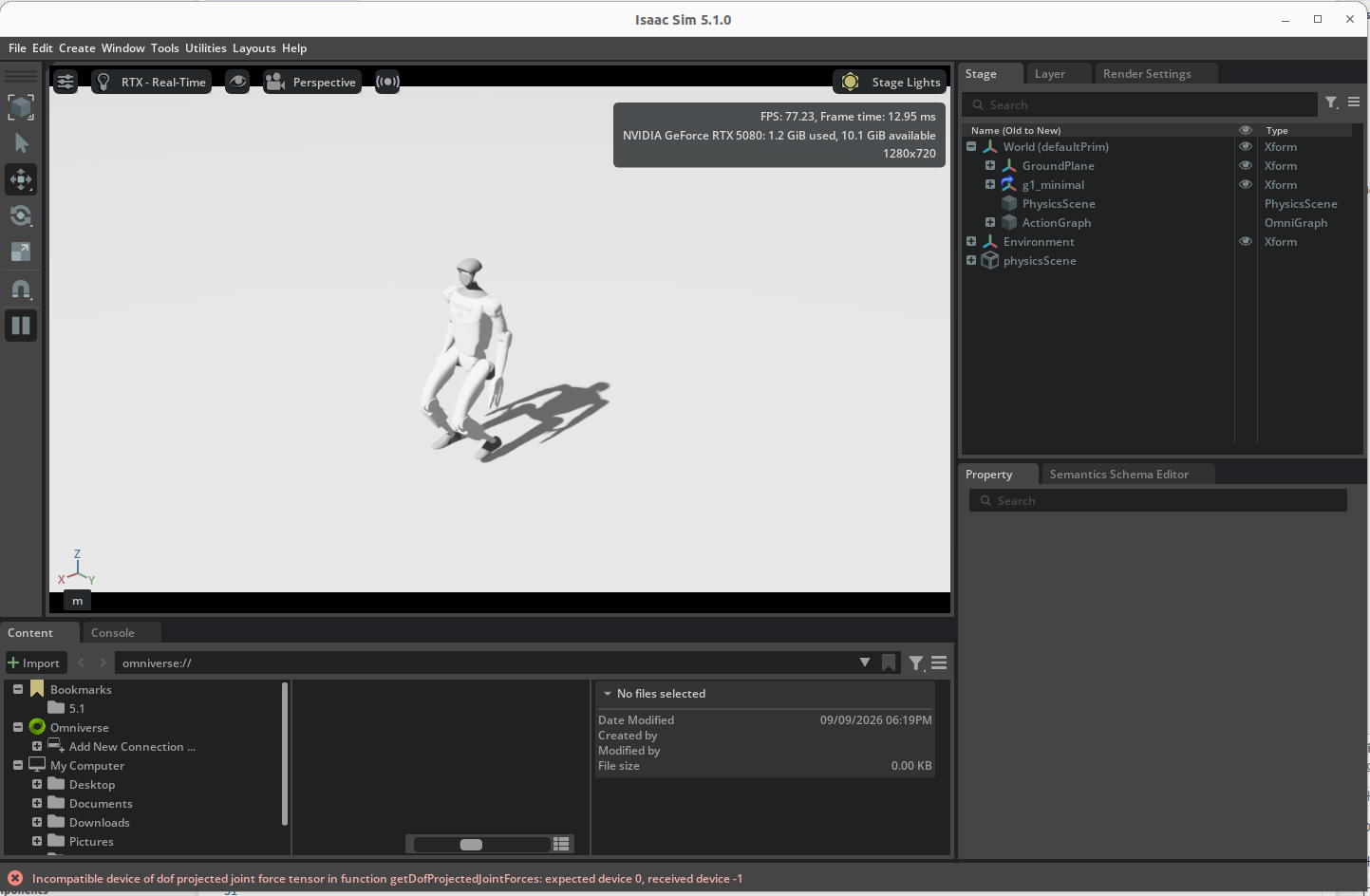
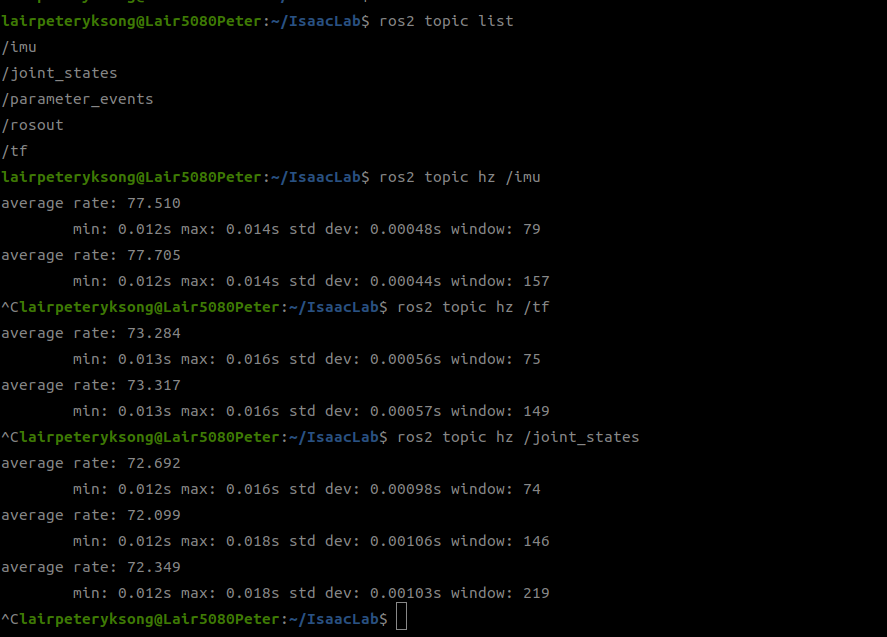
일단 지금은 동작 주기가 안맞는 문제가 있긴 하다만… 뭐 그건 나중에 다시 확인해보도록 하고. 어쨌거나 필요한건 정확한 타임스탬프 간격으로 데이터만 찍히면 그만이다.
rviz도 실행시켜보자. 실행시킬때 명령을 조금 다르게 준다.이는 ROS 의 타이머가 아니라 시뮬레이터의 타이머를 쓰기 위해 옵션을 추가하자.
rviz2 --ros-args -p use_sim_time:=true
일단 실행시키면, 좌측 상단에 있는 Fixed frame을 world로 수정한다. USD 의 world prim을 뜻한다.
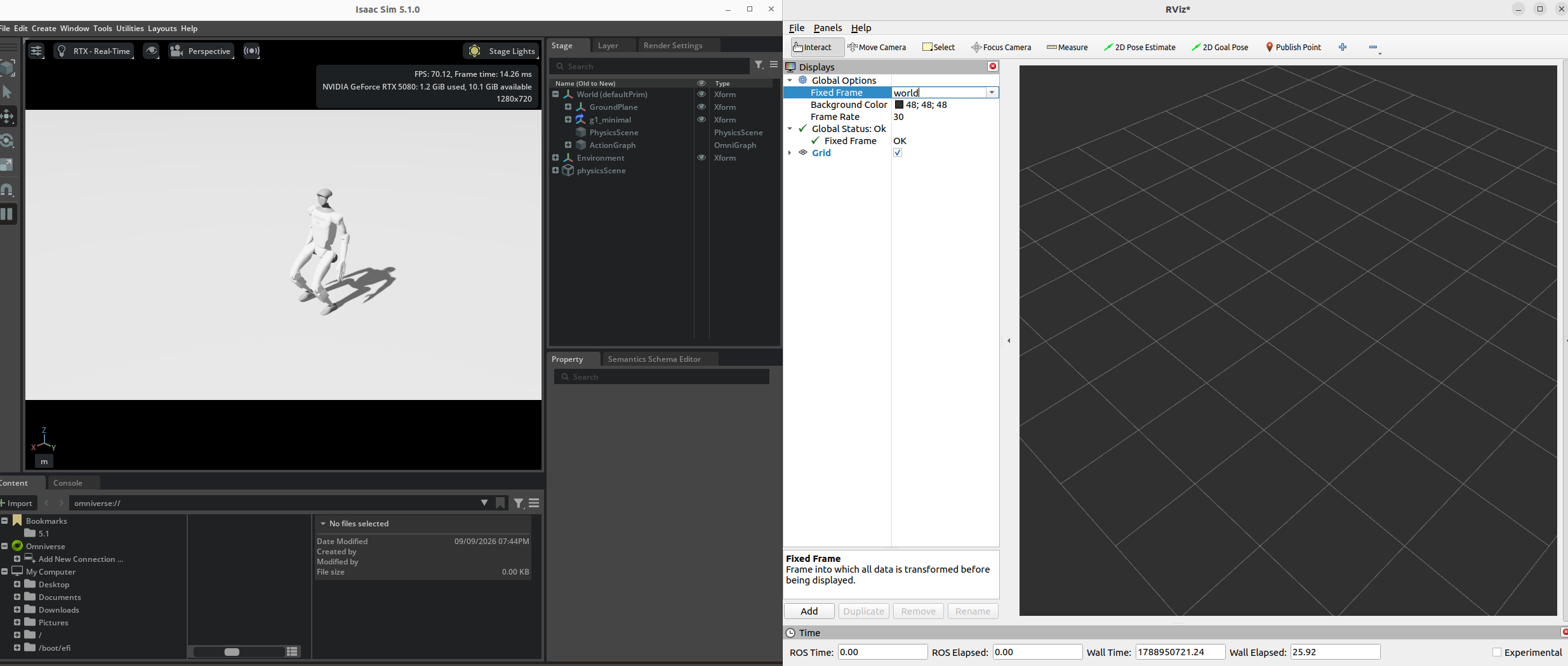
그다음 Add 버튼을 눌러 TF 를 추가한다. 그럼 수많은 좌표계들이 뜨는걸 확인할 수 있다.
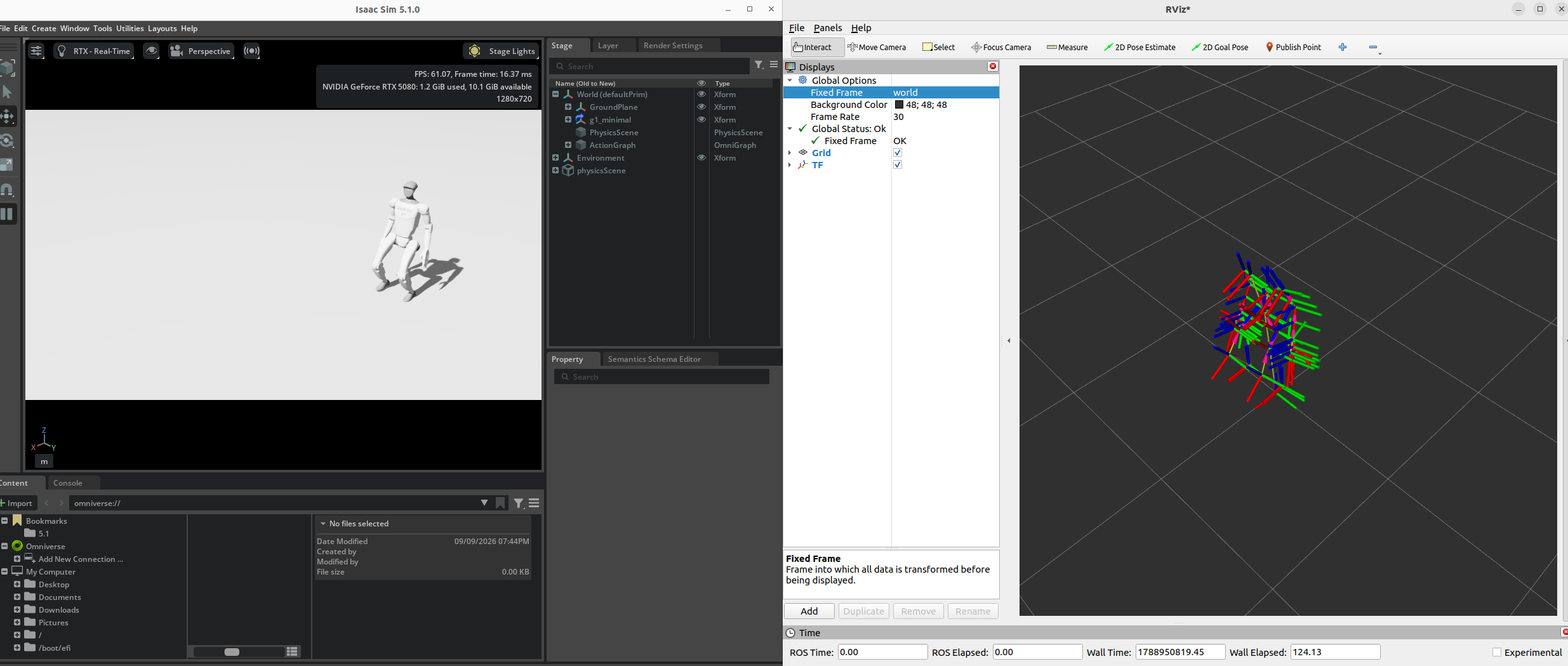
이렇게 ROS와 연동되는것 까지 확인했다.
다음번엔 각종 센서값들을 연동해보고, 그걸 ROSBag으로 저장해보는것까지 해보자.
댓글남기기